








What Is Microsoft Internet Explorer and How It Works
Microsoft Internet Explorer is one of the earliest and most widely used web browsers developed by Microsoft. It played a major role in making the Internet accessible to millions of users around the world. In computer science, understanding Internet Explorer helps students learn how web browsers function, how web pages are rendered, and how users interact with online content. Although it has now been replaced by newer browsers, Internet Explorer remains an important part of the history and evolution of web technologies.
Definition and Meaning
Microsoft Internet Explorer is a graphical web browser developed by Microsoft that allows users to access, browse, and interact with websites on the World Wide Web.
- Web Browser - A software application used to access and display web pages.
- Rendering Engine - The component that interprets HTML, CSS, and JavaScript to display web content.
- World Wide Web - A system of interlinked web pages accessed through the Internet.
- URL - Uniform Resource Locator, the address of a web page.
How It Works / Working Principle
The Internet Explorer working process involves requesting, receiving, and displaying web content from web servers. It acts as an interface between the user and the Internet.
- The user enters a URL in the address bar.
- Internet Explorer sends a request to the appropriate web server using HTTP or HTTPS.
- The server responds by sending back web files such as HTML, CSS, images, and scripts.
- The browser's rendering engine processes these files.
- The formatted web page is displayed on the screen for user interaction.
This process happens within seconds and allows users to navigate between different web pages smoothly.
Types and Classification
Microsoft released multiple versions of Internet Explorer over the years. These versions improved performance, security, and compatibility.
Versions of Internet Explorer
| Version | Released Year | Main Features |
|---|---|---|
| Internet Explorer 1 | 1995 | Basic browsing capabilities |
| Internet Explorer 6 | 2001 | Improved CSS support and security updates |
| Internet Explorer 11 | 2013 | Better performance, HTML5 support, enhanced security |
Internet Explorer 11 was the final version before Microsoft replaced it with Microsoft Edge.
Components and Structure
The Internet Explorer interface contains several important components that help users browse efficiently.

Microsoft Internet Explorer Icon
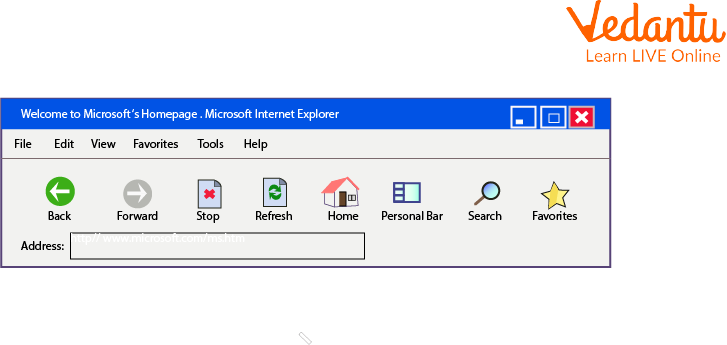
Internet Explorer Toolbar
- Address Bar - Used to enter website URLs.
- Back and Forward Buttons - Navigate between visited pages.
- Refresh Button - Reloads the current web page.
- Home Button - Opens the default home page.
- Tabs - Allow multiple web pages to open in a single window.
- Favorites - Save frequently visited websites.
Features and Characteristics
- Graphical user interface for easy navigation.
- Support for HTML, CSS, and JavaScript.
- Tabbed browsing in later versions.
- Integrated with Microsoft Windows operating system.
- Security features such as Protected Mode and SmartScreen Filter.
- Download manager for managing files from the web.
Advantages
- Pre-installed on Windows systems.
- Simple and user-friendly interface.
- Strong integration with Microsoft products.
- Enterprise compatibility for older web applications.
Disadvantages / Limitations
- Slower performance compared to modern browsers.
- Limited support for modern web standards in older versions.
- Security vulnerabilities in earlier releases.
- Official support discontinued by Microsoft.
Applications and Use Cases
- Browsing websites and accessing online information.
- Accessing web-based email services.
- Running legacy enterprise web applications.
- Downloading files and software from the Internet.
Quick Facts About Microsoft Internet Explorer
| Category | Details |
|---|---|
| Type | Web Browser |
| Developed By | Microsoft Corporation |
| First Released | 1995 |
| Latest Version | Internet Explorer 11 |
| Platform | Microsoft Windows |
| Used For | Browsing and accessing web pages |
These quick facts highlight the historical and technical importance of Internet Explorer in computer science.
Comparison Table
| Feature | Internet Explorer | Modern Browsers |
|---|---|---|
| Speed | Moderate to Slow | Fast |
| Web Standards Support | Limited in older versions | Advanced HTML5 and CSS3 support |
| Security | Improved in later versions | Advanced multi-layer security |
This comparison shows how web browsers have evolved over time.
Interesting Facts About Microsoft Internet Explorer
- Internet Explorer was once the most widely used browser in the world.
- It was bundled with Windows operating systems.
- Internet Explorer 6 remained popular for many years despite newer releases.
- It introduced features like tabbed browsing in later versions.
- The browser used the Trident rendering engine.
- Microsoft officially ended support for Internet Explorer in 2022.
Conclusion
Microsoft Internet Explorer holds an important place in the history of the Internet and web development. Understanding the Internet Explorer definition, working, features, advantages, and applications helps students learn how web browsers operate and how web technologies evolved over time. Although it has been replaced by modern browsers, its contribution to the growth of the World Wide Web remains significant in computer science education.
FAQs on Introduction To Microsoft Internet Explorer in Computer Science
1. What is Microsoft Internet Explorer?
Microsoft Internet Explorer (IE) is a graphical web browser developed by Microsoft to access and view websites on the World Wide Web.
- First released in 1995 as part of Windows 95 Plus!
- Used to browse web pages using HTTP and HTTPS protocols
- Integrated with the Windows operating system
- Officially discontinued in 2022 and replaced by Microsoft Edge
2. How does Microsoft Internet Explorer work?
Internet Explorer works by sending HTTP requests to web servers and rendering HTML content into readable web pages.
- Accepts a URL from the user
- Communicates with a web server using HTTP or HTTPS
- Downloads HTML, CSS, and JavaScript files
- Uses the Trident rendering engine to display the webpage
3. What are the main features of Microsoft Internet Explorer?
Microsoft Internet Explorer provides basic web browsing, security, and developer features for accessing online content.
- Tabbed browsing for multiple web pages
- InPrivate Browsing for privacy
- Favorites and bookmarks management
- ActiveX controls support
- Developer tools for HTML, CSS, and JavaScript debugging
4. What is the Trident engine in Internet Explorer?
Trident is the layout and rendering engine used by Internet Explorer to interpret and display web content.
- Processes HTML, CSS, DOM, and scripts
- Converts source code into visual web pages
- Integrated deeply with the Windows OS architecture
- Different IE versions had different Trident versions
5. What are the advantages and disadvantages of Internet Explorer?
Internet Explorer has both historical advantages and technical limitations compared to modern web browsers.
- Advantages: Windows integration, enterprise compatibility, legacy application support
- Disadvantages: Slower performance, security vulnerabilities, limited modern web standards support
- Less optimized for modern web development frameworks
6. How is Internet Explorer different from Microsoft Edge?
Internet Explorer and Microsoft Edge differ in performance, rendering engine, security, and web standards support.
- IE uses the Trident engine, Edge uses Chromium-based Blink engine
- Edge offers better speed and compatibility
- IE focuses on legacy enterprise applications
- Edge supports modern web technologies and extensions
7. What is ActiveX in Internet Explorer?
ActiveX is a Microsoft technology that allows Internet Explorer to run interactive and embedded software components within web pages.
- Used for multimedia, file viewing, and enterprise tools
- Built on COM (Component Object Model)
- Provided extended browser functionality
- Often criticized for security risks
8. Why was Internet Explorer discontinued?
Internet Explorer was discontinued due to outdated architecture, security concerns, and poor support for modern web standards.
- Declining usage compared to Chrome and Firefox
- Compatibility issues with modern JavaScript frameworks
- Performance limitations
- Replaced by Microsoft Edge for improved web development and cybersecurity support
9. What are the main components of Internet Explorer architecture?
Internet Explorer architecture consists of user interface components, rendering engine, networking modules, and security layers.
- User Interface (UI) for interaction
- Trident rendering engine for webpage display
- Networking module for HTTP/HTTPS communication
- Security manager for zones and permissions
10. Is Internet Explorer important for exams and interview preparation?
Internet Explorer is important for theoretical understanding of web browser evolution in Computer Science exams and interviews.
- Frequently asked in questions about web browsers and history of the Internet
- Useful for understanding rendering engines and browser architecture
- Relevant in topics like operating systems, networking, and web development
- Helps compare legacy and modern browser technologies
