









What is PowerPoint and how it works with features and uses
PowerPoint is a widely used presentation software that allows users to create visually appealing slides for communication, teaching, business meetings, and academic purposes. In computer science and information technology, PowerPoint plays an important role in presenting data, concepts, and multimedia content in a structured format. It helps users combine text, images, charts, animations, and videos into a slideshow. Understanding PowerPoint in computer science is essential for students and professionals because it enhances digital communication skills and supports effective information sharing.
Definition and Meaning
PowerPoint definition refers to a presentation software developed by Microsoft that is used to create slide-based presentations. It is part of the Microsoft Office suite and is widely used in education, business, and professional environments.
- Presentation - A structured display of information using slides.
- Slide - A single page of a presentation containing text, images, or multimedia.
- Slideshow - The full-screen display of slides in sequence.
- Template - A pre-designed layout for slides.
- Animation and Transition - Visual effects applied to objects and slides.
How It Works - PowerPoint Working
The PowerPoint working process involves creating slides, adding content, formatting elements, and presenting them as a slideshow. It provides tools for inserting multimedia and organizing information in a logical order.
Steps to create a presentation in PowerPoint:
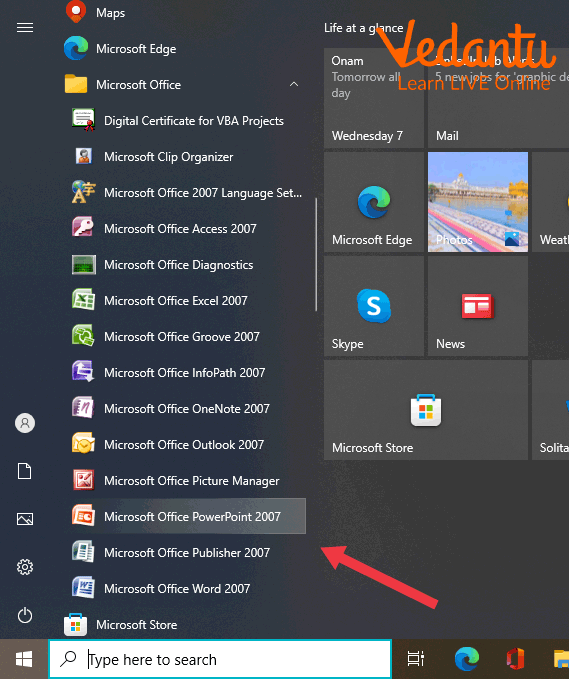
- Click on the Start icon and open Microsoft PowerPoint.

- Select Microsoft PowerPoint from the program list.
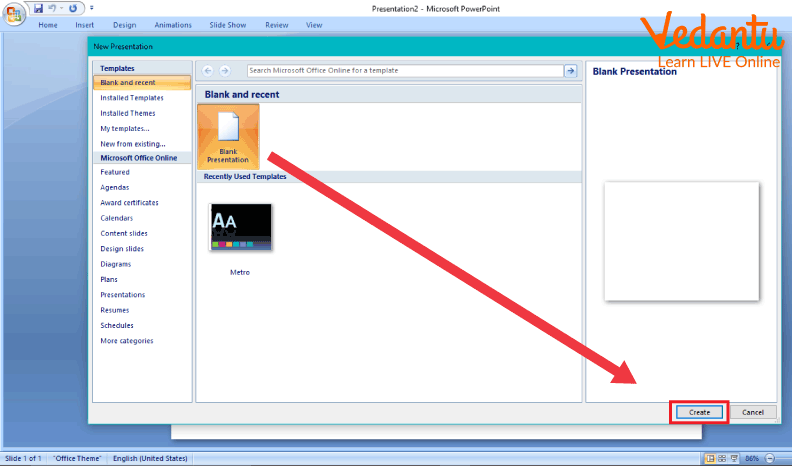
- Choose a blank presentation or a template to open a new presentation.
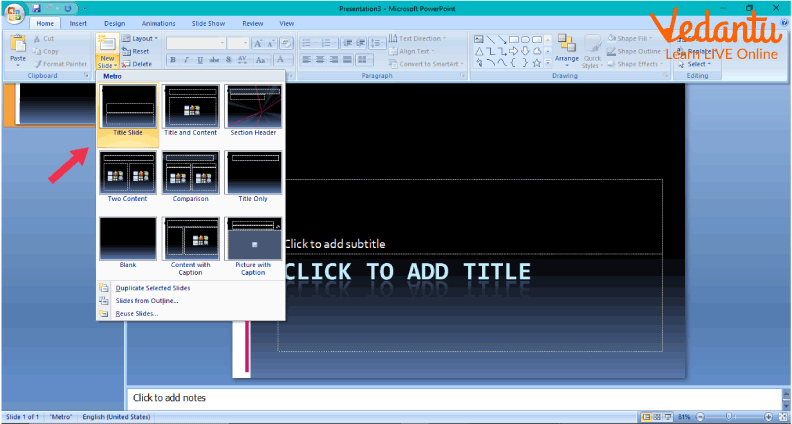
- Add new slides using the Insert or New Slide option.
- Insert text, images, charts, tables, and multimedia content.
- Apply design themes, animations, and transitions.
- Run the slideshow using the Slide Show option.
Types and Classification
Types of PowerPoint Presentations
| Type | Description | Example Use |
|---|---|---|
| Educational Presentation | Used for teaching and explaining concepts | Classroom lessons |
| Business Presentation | Used in meetings and reports | Sales pitch |
| Training Presentation | Used for skill development | Employee training |
| Multimedia Presentation | Includes audio, video, and animations | Product demo |
These PowerPoint types help users select the appropriate format depending on their purpose and audience.
Components and Structure
- Title Bar - Displays the presentation name.
- Ribbon - Contains tabs like Home, Insert, Design, and Slide Show.
- Slide Pane - Main area where slide content is created.
- Slides Panel - Shows thumbnail previews of slides.
- Status Bar - Displays slide number and view options.
Features and Characteristics
- Easy slide creation and editing.
- Built-in templates and themes.
- Support for images, audio, and video.
- Animation and transition effects.
- Chart and graph creation tools.
- Compatibility with multiple file formats.
Advantages
- Enhances visual communication.
- Easy to learn and use.
- Supports multimedia integration.
- Improves audience engagement.
- Widely supported across platforms.
Disadvantages
- Overuse of animations may distract viewers.
- Large files may consume more storage space.
- Requires a device and projector for presentation.
- Design quality depends on user skills.
Applications and Use Cases
- Classroom teaching and online education.
- Business meetings and project reports.
- Marketing and sales presentations.
- Workshops and seminars.
- Research and academic conferences.
Quick Facts About PowerPoint
| Attribute | Details |
|---|---|
| Developed By | Microsoft |
| First Released | 1987 |
| File Extension | .ppt, .pptx |
| Platform Support | Windows, macOS, Web, Mobile |
| Used For | Creating Slide Presentations |
These quick facts highlight the background and technical details of PowerPoint in computer science.
Interesting Facts About PowerPoint
- PowerPoint was originally created for the Macintosh computer.
- It was initially named Presenter before being renamed.
- Millions of presentations are created daily using PowerPoint.
- It supports exporting presentations as videos and PDFs.
- PowerPoint allows real-time collaboration through cloud services.
- The .pptx format is based on XML technology.
Conclusion
PowerPoint is a powerful and user-friendly presentation software that plays a significant role in education and professional communication. Understanding the PowerPoint definition, working, types, and features helps students develop strong digital presentation skills. Its ability to combine text, graphics, and multimedia makes it an essential tool in computer science and information technology. Learning PowerPoint enhances communication, improves visual storytelling, and supports effective knowledge sharing in various fields.
FAQs on PowerPoint in Computer Science and IT Studies
1. What is Microsoft PowerPoint in Computer Science?
Microsoft PowerPoint is a presentation software developed by Microsoft that allows users to create slide-based presentations using text, images, animations, and multimedia.
- Part of Microsoft Office Suite
- Used for academic, business, and technical presentations
- Supports multimedia, charts, and data visualization
2. What are the main features of PowerPoint?
PowerPoint features help users design interactive and visually appealing presentations efficiently.
- Slide layouts and templates
- Animations and transition effects
- SmartArt, charts, and graphs
- Audio and video embedding
- Collaboration and cloud integration via OneDrive
3. What are the main components of a PowerPoint window?
The PowerPoint interface consists of several components that help users create and manage slides effectively.
- Ribbon for tools and commands
- Slides Pane for slide thumbnails
- Slide Area for editing content
- Notes Pane for speaker notes
- Status Bar for slide information
4. What are the different types of views in PowerPoint?
PowerPoint views allow users to edit, organize, and present slides in different formats.
- Normal View for editing slides
- Slide Sorter View for rearranging slides
- Reading View for previewing
- Slide Show View for full-screen presentation
- Notes Page View for speaker notes
5. How does PowerPoint work?
PowerPoint works by organizing content into slides that can include text, graphics, multimedia, and animations for structured presentation delivery.
- Create slides using templates or blank layouts
- Add content such as text, images, charts, and videos
- Apply transitions and animations
- Run the presentation in Slide Show mode
6. What are the advantages and disadvantages of PowerPoint?
PowerPoint offers powerful presentation tools but also has certain limitations.
- Advantages: Easy to use, multimedia support, professional templates, cloud sharing
- Disadvantages: Overuse of animations can distract, file size can become large, requires compatible software
7. What are the applications of PowerPoint in real-world use?
PowerPoint applications span education, business, software development, and research communication.
- Classroom teaching and e-learning
- Business reports and project proposals
- Technical documentation and software demos
- Data visualization using charts and graphs
8. What is the difference between PowerPoint and Google Slides?
PowerPoint and Google Slides are presentation tools with differences in features and platform support.
- PowerPoint: Desktop-based, advanced animations, part of Microsoft Office
- Google Slides: Web-based, real-time collaboration, cloud-native
- Both support templates, multimedia, and sharing
9. What file formats are supported by PowerPoint?
PowerPoint supports multiple file formats for saving, sharing, and exporting presentations.
- .pptx as default presentation format
- .ppt for older versions
- .pdf for document sharing
- .ppsx for slideshow mode
- Export to video formats like .mp4
10. Is PowerPoint important for exams and interviews?
PowerPoint knowledge is important for school exams, college presentations, competitive exams, and job interviews.
- Common topic in basic Computer Science curriculum
- Useful for project presentations and seminars
- Required skill in corporate and IT job roles
- Frequently asked in practical exams
