


Class 12 Computer Science Chapter 5 Important Questions with Answers PDF Download
Sorting is the process of arranging data in a particular order. The following 15 questions include MCQs, very short answers, short answers and long answers. They focus on tracing sorting passes, comparing algorithms, writing Python code and understanding their performance.
Class 12 Computer Science Chapter 5 MCQs with Answers
Q1. Consider the list [8, 7, 13, 1, -9, 4]. What will it be after the first complete pass of Bubble Sort in ascending order?
(a) [7, 8, 1, -9, 4, 13]
(b) [-9, 7, 13, 1, 8, 4]
(c) [7, 1, -9, 4, 8, 13]
(d) [-9, 1, 4, 7, 8, 13]
Answer: (a) [7, 8, 1, -9, 4, 13]
Explanation: Bubble Sort compares adjacent elements and swaps them when they are in the wrong order. After the first pass, the largest element (13) reaches the last position.
Q2. Which statement correctly describes Selection Sort?
(a) It repeatedly swaps neighbouring elements.
(b) It selects the smallest element from the unsorted part and places it in its correct position.
(c) It inserts every element at the end of the list.
(d) It arranges elements without comparing them.
Answer: (b) It selects the smallest element from the unsorted part and places it in its correct position.
Explanation: Selection Sort divides the list into sorted and unsorted parts. During each pass, it finds the smallest element in the unsorted part and places it at the beginning of that part.
Q3. What will be the list after the first pass of Insertion Sort in ascending order?
numbers = [9, 4, 7, 2]
(a) [2, 4, 7, 9]
(b) [4, 9, 7, 2]
(c) [4, 7, 9, 2]
(d) [9, 4, 2, 7]
Answer: (b) [4, 9, 7, 2]
Explanation: In the first pass, Insertion Sort compares 4 with 9. Since 4 is smaller, 9 shifts right and 4 is inserted before it.
Q4. What is the worst-case time complexity of the basic Bubble Sort algorithm?
(a) O(1)
(b) O(n)
(c) O(n²)
(d) O(log n)
Answer: (c) O(n²)
Explanation: The basic Bubble Sort algorithm uses nested loops for repeated comparisons. As the number of elements increases, the number of comparisons grows quadratically.
Class 12 Computer Science Chapter 5 Very Short Answer Questions
Q5. What is sorting? Give two examples from everyday life.
Answer: Sorting is the process of arranging elements in a particular order, such as ascending, descending or alphabetical order.
Examples:
Arranging students by roll number.
Arranging words alphabetically in a dictionary.
Sorting makes information easier to organise and locate.
Q6. What is a pass in a sorting algorithm? How many passes are generally required to sort n elements using Bubble Sort?
Answer: A pass is one complete iteration through the relevant part of a list during sorting. The standard Bubble Sort algorithm requires at most n − 1 comparison passes to arrange n elements in ascending order. An optimised version can stop early if no swaps occur in a pass.
Q7. Why is Insertion Sort compared to arranging playing cards?
Answer: Insertion Sort places each new element in its correct position within an already sorted part of the list.
This is similar to arranging playing cards in your hand, where you insert each new card into its proper position among the cards already arranged.
Class 12 Computer Science Chapter 5 Short Answer Questions
Q8. Differentiate between Bubble Sort, Selection Sort and Insertion Sort.
Answer:
Explanation: All three algorithms sort elements, but they use different methods. Bubble Sort compares adjacent elements, Selection Sort finds the smallest element, and Insertion Sort maintains a growing sorted portion.
Q9. Show the partially sorted list after three complete passes of Bubble Sort for the following list.
numList = [7, 11, 3, 10, 17, 23, 1, 4, 21, 5]
Answer:
Explanation:
In Pass 1, the largest element, 23, moves to the final position.
In Pass 2, 21 moves to the second-last position.
In Pass 3, 17 moves to the third-to-last position.
The remaining elements are still partially unsorted because Bubble Sort needs additional passes to complete the arrangement.
Q10. Identify the errors in the following Bubble Sort program and write the corrected code.
def bubble_sort(a):
n = len(a)
for i in range(n):
for j in range(n - i - 1):
if a[j] < a[j + 1]:
a[j], a[j + 1] = a[j + 1], a[j]
numbers = [5, 2, 8, 1]
bubble_sort(numbers)
print(numbers)
The program is intended to arrange the list in ascending order.
Answer: The comparison operator is incorrect for ascending order. The condition a[j] < a[j + 1] places larger values first, producing descending order.
The comparison must be changed to a[j] > a[j + 1].
Corrected Program:
def bubble_sort(a):
n = len(a)
for i in range(n):
for j in range(n - i - 1):
if a[j] > a[j + 1]:
a[j], a[j + 1] = a[j + 1], a[j]
numbers = [5, 2, 8, 1]
bubble_sort(numbers)
print(numbers)
Output:
[1, 2, 5, 8]
Explanation: In ascending Bubble Sort, swap two adjacent elements when the left element is greater than the right element. This gradually moves larger elements towards the end of the list.
Q11. Explain constant, linear and quadratic time complexity with examples.
Answer:
Explanation: Time complexity describes how an algorithm's work grows as the input size increases. It helps programmers compare algorithms when working with large amounts of data.
A nested loop does not always imply O(n²); the number of iterations determines the actual complexity. The basic sorting algorithms discussed in the textbook have quadratic worst-case time complexity.
Class 12 Computer Science Chapter 5 Long Answer Questions
Q12. Compare Bubble Sort and Selection Sort for the list [63, 42, 21, 9]. Calculate the number of swaps and comparisons required to arrange it in ascending order.
Answer: Both techniques produce the same sorted list, but they move elements differently.
Part A: Bubble Sort
Total swaps: 6. Total comparisons: 3 + 2 + 1 = 6
Part B: Selection Sort
Total swaps: 2
Total comparisons: 3 + 2 + 1 = 6
Comparison:
Conclusion: Selection Sort performs fewer swaps for this list, but both basic algorithms make the same number of comparisons. Therefore, Selection Sort is better here in terms of swaps, not comparisons.
Q13. Write a Python program for Selection Sort and show the list after four complete passes.
Use:
numbers = [7, 11, 3, 10, 17, 23, 1, 4, 21, 5]
Answer: Selection Sort repeatedly finds the smallest value from the unsorted portion and places it at the beginning of that portion.
Python Program:
def selection_sort(a):
n = len(a)
for i in range(n - 1):
min_index = i
for j in range(i + 1, n):
if a[j] < a[min_index]:
min_index = j
if min_index != i:
a[i], a[min_index] = a[min_index], a[i]
print("Pass", i + 1, ":", a)
numbers = [7, 11, 3, 10, 17, 23, 1, 4, 21, 5]
selection_sort(numbers)
List After the First Four Passes:
Visual: How the Sorted Portion Grows
Selection Sort – First Four Passes
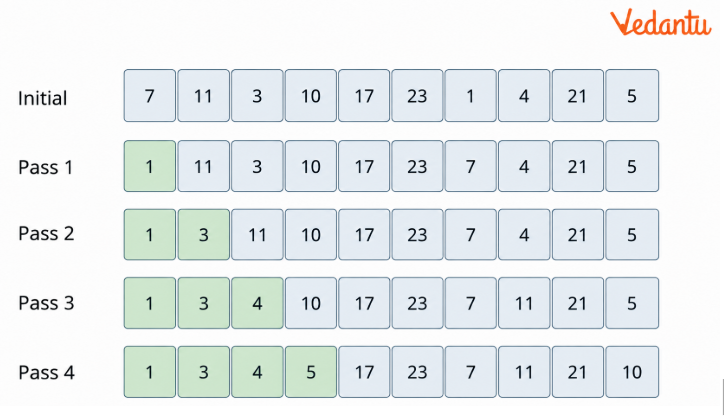
Each pass moves the next smallest element into the sorted left-hand portion of the list.
Explanation:
The first pass finds 1 and swaps it with 7.
The second pass places 3 at index 1.
The third pass places 4 at index 2.
The fourth pass places 5 at index 3.
The remaining elements are sorted by continuing the same process.
Key Learning: Selection Sort places one element in its final position during each pass.
Q14. Write a Python program using a user-defined Bubble Sort function to find the median of a list of numbers.
Answer: The median is the middle value of an ordered collection. For an odd number of elements, it is the centre value. For an even number of elements, it is the average of the two middle values.
Python Program:
def bubble_sort(a):
n = len(a)
for i in range(n - 1):
for j in range(n - i - 1):
if a[j] > a[j + 1]:
a[j], a[j + 1] = a[j + 1], a[j]
def find_median(numbers):
if len(numbers) == 0:
return None
data = numbers.copy()
bubble_sort(data)
n = len(data)
mid = n // 2
if n % 2 != 0:
return data[mid]
else:
return (data[mid - 1] + data[mid]) / 2
marks = [35, 12, 50, 20, 45]
print("Median:", find_median(marks))
Output:
Median: 35
Explanation:
The original list contains five numbers.
Bubble Sort arranges them as [12, 20, 35, 45, 50].
Since the number of elements is odd, it selects the middle element.
The element at index 5 // 2 = 2 is 35.
For an Even Number of Elements:
If the sorted list is:
[10, 20, 30, 40]
The median is: $$\mathrm{Median} = \dfrac{20 + 30}{2} = 25$$
Key Learning: Sorting lets you identify the correct middle value when calculating the median.
Q15. A school stores student names in alphabetical order as each student registers. Identify the sorting technique and write a Python program to maintain the ordered list.
Answer: The method is based on insertion sort because each new name is inserted into its correct position among the names already stored in sorted order.
Python Program:
def insert_name(names, new_name):
names.append(new_name)
i = len(names) - 2
while i >= 0 and names[i].lower() > new_name.lower():
names[i + 1] = names[i]
i -= 1
names[i + 1] = new_name
student_names = []
n = int(input("Number of students: "))
for i in range(n):
name = input("Enter student name: ")
insert_name(student_names, name)
print("Sorted Names:", student_names)
Sample Input and Output:
Number of students: 4
Enter student name: Riya
Sorted Names: ['Riya']
Enter student name: Aman
Sorted Names: ['Aman', 'Riya']
Enter student name: Neha
Sorted Names: ['Aman', 'Neha', 'Riya']
Enter student name: Kabir
Sorted Names: ['Aman', 'Kabir', 'Neha', 'Riya']
Explanation:
An empty list is created to store student names.
When a new name is entered, temporary space is created at the end of the list.
The program compares the new name with the existing names from right to left.
Names that come after it alphabetically are shifted one position to the right.
The new name is inserted into its correct position.
The list remains alphabetically sorted after every insertion.
Key Learning: Insertion Sort is useful when elements arrive one at a time and must be placed in an already ordered collection.
How Does Sorting Help in Class 12 Computer Science Chapter 5?
Sorting helps students understand how to arrange numbers, names and other data in a required order. Vedantu's Class 12 Computer Science Chapter 5 Important Questions cover different sorting methods through Python programs, step-by-step examples and algorithm comparisons.
How to Practise Class 12 Computer Science Chapter 5 Sorting Important Questions Effectively?
Trace sorting passes: Write the list after each pass and identify the sorted portion.
Compare sorting methods: Observe how Bubble, Selection and Insertion Sort move elements.
Practise Python programs: Write sorting functions using loops and comparisons.
Count swaps and comparisons: Understand the work performed by each algorithm.
Check sorting conditions: Use the correct comparison operator for ascending or descending order.
Practising these problems helps students understand sorting logic, debug Python programs and prepare for Computer Science examinations.
Important Study Material Links for Class 12 Computer Science Chapter 5 Sorting
Students can revise sorting concepts using these chapter-specific solutions and revision notes.
Class 12 Computer Science Chapter-Wise Important Questions
Additional Study Materials for Class 12 Computer Science
FAQs on Important Questions and Answers for Class 12 Computer Science Chapter 5 Sorting | 2026-27
1. Which types of questions are commonly practised in Class 12 Computer Science Chapter 5 Sorting?
Students can practise MCQs, output-based questions, sorting-pass calculations, Python programming and error-correction questions. The Class 12 Computer Science Chapter 5 Important Questions and Answers also help students understand how Bubble Sort, Selection Sort and Insertion Sort work through step-by-step examples.
2. Where can students find the Class 12 Computer Science Chapter 5 Important Questions PDF with answers?
Students can access the solved questions on Vedantu and download the Class 12 Computer Science Chapter 5 Important Questions PDF once it becomes available. The practice material includes MCQs, short answers, Python sorting programs and step-by-step solutions to support chapter revision.
3. How should students prepare for Class 12 Computer Science Chapter 5 Important Questions for exams?
Begin by understanding how each sorting algorithm works. Practise tracing lists after every pass, identifying comparisons and swaps, and writing Python programs without referring to solutions. Then try debugging and output-based questions to strengthen programming skills and prepare for exams.
4. How can students identify the correct output after each pass of Bubble Sort?
In ascending Bubble Sort, compare adjacent elements from left to right and swap them when the left element is greater. After the first complete pass, the largest element moves to its final position. Repeat the process for the remaining unsorted elements to determine the output after subsequent passes.
5. What is the difference between Bubble Sort, Selection Sort and Insertion Sort in Python?
Bubble Sort repeatedly compares and swaps adjacent elements. Selection Sort finds the smallest element in the unsorted portion and places it in its correct position. Insertion Sort takes an element and inserts it into the appropriate position within the sorted portion. All three use comparisons but differ in how they move elements.
6. How many comparisons and swaps are required in Selection Sort?
For a list of five elements, standard Selection Sort performs 4 + 3 + 2 + 1 = 10 comparisons. The number of swaps depends on the implementation and the list's initial arrangement. If the minimum element is already in position, swaps can be skipped, reducing the number of swaps needed.
7. Why is Insertion Sort useful for sorting an almost sorted Python list?
Insertion Sort is useful because elements that are already close to their correct positions require fewer shifts. For a nearly sorted list, it can complete sorting efficiently. Its best-case time complexity is O(n) when the list is already sorted.
8. How can students correct errors in a Bubble Sort Python program?
Students should check the loop ranges, comparison condition and swapping statement. For ascending order, swap adjacent elements when the left value is greater than the right value. Using the opposite comparison produces descending order. Testing the program with a small list helps identify errors.
9. Why do Bubble Sort, Selection Sort and Insertion Sort have O(n²) worst-case time complexity?
These sorting algorithms can require several operations that grow approximately with the square of the input size. Bubble Sort and Selection Sort perform repeated comparisons, while Insertion Sort may need to shift many elements. Their worst-case time complexity is O(n²), although their best-case performance can differ.
10. How can sorting algorithms help students solve Python programming questions involving marks and names?
Sorting algorithms can arrange student marks numerically or names alphabetically. A sorted list of marks can help calculate the median, while Insertion Sort can maintain an alphabetical list as new names are added. These examples help students connect sorting concepts with practical Python programs.