


Class 12 Computer Science Chapter 2 Important Questions with Answers PDF Download
File Handling in Python explains how programs store, read, modify and retrieve data from files. The following 15 questions cover MCQs, very short answers, short answers and long answers, with a focus on conceptual understanding, Python output prediction and practical programming.
Class 12 Computer Science Chapter 2 MCQ with Answers
Q1. What will be the final content of data.txt after executing the following Python code? Assume the file initially contains HELLO.
with open("data.txt", "w") as f:
f.write("PYTHON")
with open("data.txt", "a") as f:
f.write("12")
(a) HELLOPYTHON12
(b) PYTHON12
(c) HELLO12
(d) PYTHON
Answer: (b) PYTHON12
Explanation: Opening the file in w mode removes its previous content and writes PYTHON. Opening it in a mode then adds 12 at the end.
Q2. Consider a text file sample.txt containing COMPUTER. What will be the output of the following code?
with open("sample.txt", "r") as f:
print(f.read(3))
print(f.read(2))
(a) COM followed by CO
(b) COM followed by PU
(c) COMPUTER followed by PU
(d) COMP followed by UT
Answer: (b) COM followed by PU
Output:
COM
PU
Explanation: The first read(3) reads COM and advances the file position. The next read(2) reads the following two characters, PU.
Q3. What will be stored in names.txt after executing the following code?
with open("names.txt", "w") as f:
f.writelines(["Aman", "Riya", "Neha"])
(a) Aman Riya Neha
(b) Aman, Riya, Neha
(c) AmanRiyaNeha
(d) Each name appears on a separate line.
Answer: (c) AmanRiyaNeha
Explanation: The writelines() method writes all strings in sequence without automatically adding spaces or newline characters.
Q4. Which statement correctly stores a Python list in a binary file using the pickle module?
(a) pickle.load(data, f)
(b) pickle.dump(data, f)
(c) f.write(data)
(d) pickle.read(data, f)
Assume pickle has been imported and f is opened in binary write mode.
Answer: (b) pickle.dump(data, f)
Explanation: The pickle.dump() method serialises a Python object and writes it to a binary file. Open the file in a suitable mode, such as wb or ab.
Class 12 Computer Science Chapter 2 Very Short Answer Questions
Q5. What is a file handle in Python? Give an example.
Answer: A file handle is a file object returned by the open() function. It allows a Python program to read, write, and close a file.
Example:
f = open("data.txt", "r")
Here, f is the file handle. The file must exist when opened in r mode.
Q6. What is the difference between seek() and tell() in Python?
Answer:
tell(): Returns the current position of the file pointer.
seek(): Moves the file pointer to a specified position in the file.
Example:
f.seek(0)
print(f.tell())
Output:
0
The file pointer is moved to the beginning of the file.
Q7. Why is the with statement used while opening files in Python?
Answer: The with statement automatically closes a file when the block finishes, even if an exception occurs. It makes file handling easier and helps release resources properly.
Example:
with open("data.txt", "r") as f:
content = f.read()
There is no need to call f.close() separately.
Class 12 Computer Science Chapter 2 Short Answer Questions
Q8. Differentiate between text files and binary files in Python.
Answer:
Explanation: Both file types are stored as bytes internally. Text files use character encoding to represent readable text, while binary files can store other forms of data.
Q9. Identify the correct file opening mode and write the Python statement for each situation.
(a) Open example.txt for both reading and writing without deleting existing content. (b) Open records.dat for writing binary data, replacing existing content. (c) Open notes.txt for appending and reading. (d) Open student.dat for reading binary data only.
Answer:
Explanation: File modes determine the operations allowed on a file. Modes such as w and wb overwrite existing content, while a and a+ preserve it and append new data.
Q10. Predict the output of the following Python program and explain the role of seek() and tell().
with open("sample.txt", "w+") as f:
f.write("PYTHON")
print(f.tell())
f.seek(2)
print(f.read(3))
print(f.tell())
Answer:
Output:
6
THO
5
Explanation:
The program writes PYTHON, which contains six ASCII characters.
tell() returns 6 because the file pointer is positioned after the last character.
seek(2) moves the file pointer to position 2, where T is located.
read(3) reads THO.
The pointer moves to position 5, so the final tell() returns 5.
Positions in the file PYTHON
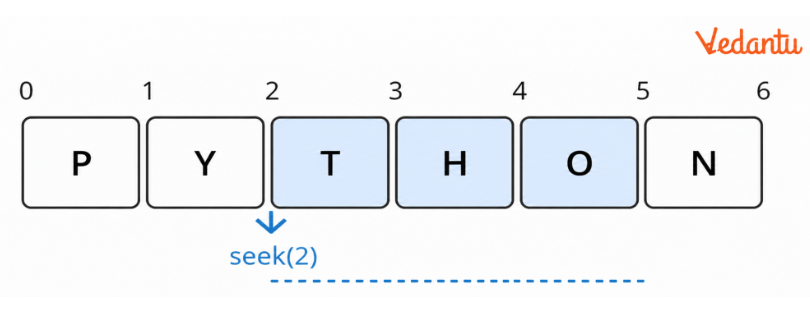
The characters T, H and O are read from positions 2, 3 and 4; the pointer then reaches position 5.
Q11. Explain the difference between read(), readline() and readlines() with an example.
Answer:
Example: Suppose sample.txt contains:
Python
Computer Science
Program:
with open("sample.txt", "r") as f:
print(repr(f.readline()))
print(repr(f.readlines()))
Output:
'Python\n'
['Computer Science\n']
Explanation: The first readline() reads the first line and moves the file pointer forward. The following readlines() reads the remaining line and returns it inside a list. This example assumes the text file ends with a newline after the second line.
Class 12 Computer Science Chapter 2 Long Answer Questions
Q12. Write a Python program to accept sentences from the user until "END" is entered. Store them in a text file and display only the sentences beginning with an uppercase letter.
Answer:
with open("sentences.txt", "w") as f:
while True:
sentence = input("Enter a sentence: ")
if sentence == "END":
break
f.write(sentence + "\n")
print("Sentences beginning with uppercase letters:")
with open("sentences.txt", "r") as f:
for line in f:
if line and line[0].isupper():
print(line, end="")
Sample Input:
Python is interesting
file handling is useful
Computer Science is important
learning Python is fun
END
Output:
Sentences beginning with uppercase letters:
Python is interesting
Computer Science is important
Explanation:
The file is opened in write mode using with open().
The program repeatedly accepts sentences until END is entered.
Each sentence is written to the file with a newline character.
The file is reopened in read mode.
The isupper() method checks whether the first character of each line is uppercase.
Only matching sentences are displayed.
Key Learning: This question combines file creation, reading, writing, loops, conditions and string methods.
Q13. Write a Python program to create a text file, append new information and display the complete file content. Explain the difference between write and append modes.
Answer:
with open("school.txt", "w") as f:
f.write("Class 12\n")
f.write("Computer Science\n")
with open("school.txt", "a") as f:
f.write("File Handling in Python\n")
with open("school.txt", "r") as f:
print(f.read())
Output:
Class 12
Computer Science
File Handling in Python
Explanation:
The file is first opened in w mode, creating it if necessary.
Two lines are written using write().
The file is reopened in a mode.
The third line is appended without deleting the earlier information.
The file is then opened in r mode, and its complete content is displayed.
Difference Between Write and Append Modes
Q14. Write a Python program to store item records in a binary file using pickle. Read the records and display the item number, name, quantity, price and total amount.
Answer: The pickle module allows Python programs to store and retrieve objects in binary files.
The following program accepts item records containing the item number, name, quantity and price. It then calculates and displays the total amount for each item.
import pickle
n = int(input("Enter number of items: "))
with open("items.dat", "wb") as f:
for i in range(n):
item_no = int(input("Item number: "))
name = input("Item name: ")
qty = int(input("Quantity: "))
price = float(input("Price: "))
record = [item_no, name, qty, price]
pickle.dump(record, f)
print("Stored Item Records:")
with open("items.dat", "rb") as f:
while True:
try:
record = pickleload(f)
item_no, name, qty, price = record
amount = qty * price
print("Item No:", item_no)
print("Item Name:", name)
print("Quantity:", qty)
print("Price:", price)
print("Amount:", amount)
print()
except EOFError:
break
Sample Input:
Enter number of items: 2
Item number: 101
Item name: Pen
Quantity: 5
Price: 10
Item number: 102
Item name: Notebook
Quantity: 3
Price: 40
Output:
Stored Item Records:
Item No: 101
Item Name: Pen
Quantity: 5
Price: 10.0
Amount: 50.0
Item No: 102
Item Name: Notebook
Quantity: 3
Price: 40.0
Amount: 120.0
Explanation:
The program imports the pickle module.
It accepts the number of item records.
Each record is stored as a Python list.
pickle.dump() serialises the list and writes it to the binary file.
The file is reopened using rb mode.
pickle.load() retrieves each stored record.
The amount is calculated using quantity × price.
EOFError is caught when there are no more records to read.
Key Learning: This question tests binary file handling, serialisation, deserialisation, iteration and exception handling.
Q15. Explain how reading and writing can be performed using the same file object in Python. Write a program using w+, seek() and tell() to demonstrate the process.
Answer: Python allows both reading and writing through one file object using modes such as w+ and r+.
The w+ mode opens a file for reading and writing. If the file already exists, its previous content is removed. If it does not exist, a new file is created.
Program:
with open("report.txt", "w+") as f:
f.write("Python\n")
f.write("File Handling\n")
print("Current Position:", f.tell())
f.seek(0)
print("File Contents:")
print(f.read(), end="")
Output:
Current Position: 21
File Contents:
Python
File Handling
Explanation:
The program opens report.txt in w+ mode.
It writes two lines to the file.
The written text contains 21 bytes in UTF-8, including the two newline characters, assuming the usual \n representation.
tell() displays the current file position at the end of the written content.
seek(0) moves the file pointer to the beginning.
read() retrieves and displays the contents using the same file object.
Why is seek(0) necessary?
After writing, the file pointer is positioned at the end. To read the newly written data from the beginning, you must reset the pointer using seek(0).
This demonstrates how one file object can perform reading and writing operations.
Why is File Handling Important in Class 12 Computer Science Chapter 2?
File Handling in Python teaches students how to store, read and update data using Python programs. Vedantu's Class 12 Computer Science Chapter 2 Important Questions help students practise these concepts through solved coding and output-based questions.
How to Practise Class 12 Computer Science Chapter 2 Important Questions Effectively?
Practise file operations: Create, read and update text files.
Understand file modes: Learn the difference between overwriting and appending data.
Solve output-based questions: Track file pointer movements and predict outputs.
Work with binary files: Practise storing and retrieving records using pickle.
Avoid common errors: Use correct file modes and newline characters.
Regular practice helps students strengthen their Python programming skills and prepare for CBSE exams.
Important Study Material Links for Class 12 Computer Science Chapter 2
Class 12 Computer Science Chapter-Wise Important Questions
Explore Vedantu's Class 12 Computer Science chapter-wise important questions PDF resources for practice and focused revision.
Additional Study Materials for Class 12 Computer Science
FAQs on Important Questions and Answers for Class 12 Computer Science Chapter 2 File Handling in Python | 2026-27
1. Where can I download Class 12 Computer Science Chapter 2 Important Questions and Answers PDF?
Students can download the Class 12 Computer Science Chapter 2 Important Questions and Answers PDF from Vedantu to prepare for exams. It includes solved MCQs, short-answer questions, Python coding exercises and file-handling programs. Students can also explore chapter-wise PDF resources for Class 12 Computer Science important questions for additional revision.
2. What happens if an existing text file is opened in w+ mode?
Opening an existing file in w+ mode deletes its previous contents and allows both reading and writing. The file pointer initially starts at the beginning. After writing data, students can use seek(0) to return to the beginning before reading it.
3. Why does writelines() not display each string on a separate line?
The writelines() method writes the supplied strings exactly as provided. It does not automatically insert newline characters. To write each string on a separate line, students must include \n in the strings.
4. What happens when read() is called after the file pointer reaches the end of a file?
When the file pointer reaches the end of a text file, read() returns an empty string because no characters remain to be read. Students can use seek(0) to move back to the beginning and read the contents again.
5. Why should students use the with statement instead of open() and close() separately?
The with statement automatically closes the file when its block finishes, including when an exception occurs. This reduces the risk of leaving files open and makes file-handling programs easier to manage.
6. Can Python read and write data using the same file object?
Yes. Modes such as r+, w+ and a+ support both reading and writing. However, their behaviour differs. For example, r+ preserves existing contents when opened, while w+ clears them. Students should understand these differences before choosing a mode.
7. Why is EOFError used while reading binary files with pickle?
When a program repeatedly uses pickle.load() to retrieve stored objects, Python raises EOFError after the last object has been read. Students can catch this exception to stop the reading loop without an unexpected program termination.
8. Can a Python list or dictionary be stored directly in a text file?
The write() method for a text file accepts strings, not list or dictionary objects directly. Students can convert an object into a string before writing it. To preserve and retrieve Python objects in a binary file, they can use the pickle module.
9. How do I solve Class 12 Computer Science Chapter 2 Important Questions involving file modes?
First, identify whether the question requires reading, writing, appending or a combination of operations. Then choose the correct file mode and check whether the file must already exist. Finally, trace how each operation affects the contents and file pointer.
10. What happens if a file is opened in read mode but does not exist?
Python raises a FileNotFoundError when a program tries to open a non-existent file in read mode. Students can handle this exception with a try-except block or by checking whether the file exists before opening it.