


Class 12 Computer Science Chapter 1 Important Questions with Answers PDF Download
Exception Handling in Python explains how a program detects and responds to errors during execution. The following 15 important questions include MCQs, very short answers, short answers and long answers. They focus on both conceptual understanding and practical Python programming.
Class 12 Computer Science Chapter 1 MCQ with Answers
Q1. What will be the output of the following Python program?
try:
a = 20
b = 0
print(a / b)
except ValueError:
print("Invalid Value")
except ZeroDivisionError:
print("Division by Zero")
finally:
print("Program Completed")
(a) Invalid Value
(b) Division by Zero
(c) Division by Zero followed by Program Completed
(d) Program Completed only
Answer: (c) Division by Zero followed by Program Completed
Explanation: Dividing 20 by zero raises a ZeroDivisionError. The corresponding except block executes, followed by the finally block.
Output:
Division by Zero
Program Completed
Q2. Consider the following Python code. What will happen when it is executed?
numbers = [10, 20, 30]
try:
print(numbers[5])
except IndexError:
print("Invalid Index")
else:
print("Access Successful")
(a) 30
(b) Invalid Index
(c) Access Successful
(d) Both Invalid Index and Access Successful
Answer: (b) Invalid Index
Explanation: The list contains three elements at indices 0, 1 and 2. Accessing index 5 raises an IndexError. The except block executes, while the else block is skipped.
Q3. What will be the output of the following code?
try:
value = int("12.5")
print(value)
except ValueError:
print("Conversion Failed")
finally:
print("End")
(a) 12.5
(b) 12
(c) Conversion Failed followed by End
(d) End only
Answer: (c) Conversion Failed followed by End
Explanation: The string "12.5" cannot be directly converted into an integer using int(). Python raises a ValueError, so the exception handler executes. The finally block also runs.
Output:
Conversion Failed
End
Q4. Identify the correct output of the following Python program.
try:
x = 15
assert x % 2 == 0, "Odd Number"
print("Even Number")
except AssertionError as e:
print(e)
(a) Even Number
(b) Odd Number
(c) AssertionError
(d) No output
Answer: (b) Odd Number
Explanation: The condition 15 % 2 == 0 is false. Therefore, assert raises an AssertionError with the message "Odd Number". The except block catches the exception and prints the message.
Class 12 Computer Science Chapter 1 Very Short Answer Questions
Q5. What is an exception in Python? Give two examples.
Answer: An exception is an error-related object that Python raises when an exceptional situation occurs during program execution. An unhandled exception can interrupt a program's normal execution.
Examples:
ZeroDivisionError: Raised when a number is divided by zero.
IndexError: Raised when a sequence index is outside the valid range.
Q6. Differentiate between throwing and catching an exception in Python.
Answer:
Throwing an exception: Raising an exception when an error occurs or when the programmer explicitly uses raise.
Catching an exception: The process of handling a raised exception using a suitable exception handler.
For example, when a program attempts division by zero, Python raises ZeroDivisionError. An except ZeroDivisionError block can catch and handle it.
Q7. What is the purpose of the else and finally clauses in exception handling?
Answer:
else: Executes when the try block completes without raising an exception.
finally: Executes when control leaves the try statement, whether an exception occurred or not. It is commonly used for cleanup operations.
Class 12 Computer Science Chapter 1 Short Answer Questions
Q8. Justify the statement: "Every syntax error is an exception, but every exception is not a syntax error."
Answer: Python represents syntax errors using exception classes such as SyntaxError. However, exceptions can also occur when a syntactically correct program performs an invalid operation during execution.
For example:
Syntax error:
if 10 > 5
print("True")
This code raises SyntaxError because the colon (:) is missing after the if condition.
Runtime exception:
a = 10
b = 0
print(a / b)
This program has valid syntax but raises ZeroDivisionError during execution.
Therefore, syntax errors form one category of Python exceptions, but exceptions are not limited to syntax errors.
Q9. Identify the exceptions raised by the following Python statements and explain their causes.
(a) print(25 / 0)
(b) print(int("Python"))
(c) print(data) when data has not been defined
(d) print([5, 10, 15][4]) (e) print("Age:" + 18)
Answer:
Explanation: Understanding the causes of built-in exceptions helps students identify programming mistakes and select appropriate exception handlers.
Q10. Complete the following Python program by filling in the missing keywords and exception names.
print("Learning Exceptions")
try:
num1 = int(input("Enter first number: "))
num2 = int(input("Enter second number: "))
result = num1 / num2
except __________:
print("Enter valid integers")
except __________:
print("Denominator cannot be zero")
else:
print("Result:", result)
__________:
print("Program Finished")
Answer:
The missing entries, in order, are:
ValueError
ZeroDivisionError
finally
Completed Program:
print("Learning Exceptions")
try:
num1 = int(input("Enter first number: "))
num2 = int(input("Enter second number: "))
result = num1 / num2
except ValueError:
print("Enter valid integers")
except ZeroDivisionError:
print("Denominator cannot be zero")
else:
print("Result:", result)
finally:
print("Program Finished")
Explanation:
ValueError handles invalid integer input.
ZeroDivisionError handles division by zero.
else displays the result when no exception occurs.
finally displays "Program Finished" after the operation or exception handling.
Q11. Predict the output of the following Python program for each input: (i) 5, (ii) 0 and (iii) abc.
try:
x = int(input("Enter a number: "))
result = 20 / x
except ValueError:
print("Invalid Input")
except ZeroDivisionError:
print("Cannot Divide")
else:
print("Result:", result)
finally:
print("Execution Complete")
Answer:
Case (i): Input = 5
Result: 4.0
Execution Complete
Since 20 divided by 5 is 4.0, no exception occurs. The else and finally blocks execute.
Case (ii): Input = 0
Cannot Divide
Execution Complete
Division by zero raises ZeroDivisionError. Its matching exception handler executes, followed by finally.
Case (iii): Input = abc
Invalid Input
Execution Complete
The input "abc" cannot be converted into an integer, so ValueError is raised. The corresponding handler executes, followed by finally.
Key Learning: This question tests input conversion, exception identification and the execution order of try, except, else and finally.
Class 12 Computer Science Chapter 1 Long Answer Questions
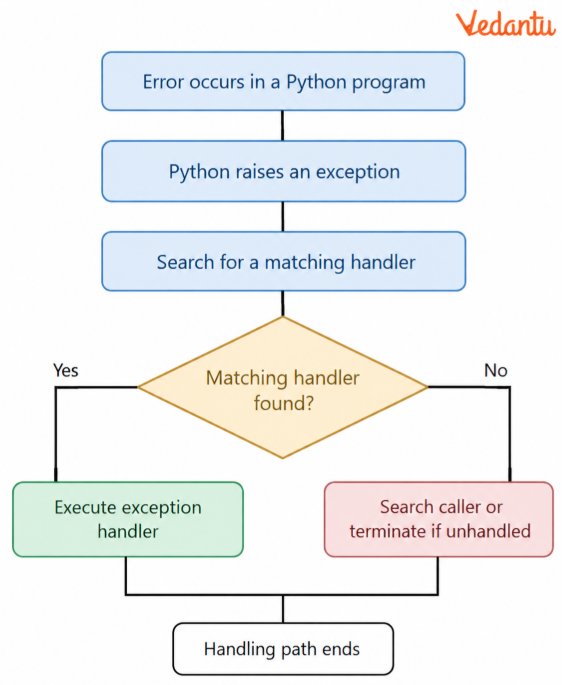
Q12. Explain the exception-handling process in Python with a suitable program and flowchart.
Answer: Exception handling is the process of identifying and managing errors that may occur while a Python program is running. It helps a program respond to unexpected situations without terminating abruptly.
The exception-handling process involves the following steps:
Exception occurs: An invalid operation occurs during program execution.
Exception is raised: Python creates an exception object containing information about the error.
Handler is searched: Python looks for an appropriate exception handler.
Exception is caught: If Python finds a matching handler, it executes its code.
Exception propagates: If no matching handler is available in the current context, Python searches through the calling contexts.
Program termination: If the exception remains unhandled, normal execution stops, and Python displays a traceback.
Flowchart of Exception Handling in Python
Example Program:
try:
a = 50
b = int(input("Enter denominator: "))
result = a / b
print("Result:", result)
except ZeroDivisionError:
print("Cannot divide by zero")
except ValueError:
print("Enter a valid integer")
Explanation: The program attempts to divide 50 by the user's input. If the denominator is zero, it handles ZeroDivisionError. If the input cannot be converted into an integer, it handles ValueError. Otherwise, it prints the quotient.
Q13. Write a Python program that accepts two numbers and displays their quotient. Use both raise and assert statements to check for a zero denominator.
Answer: Both raise and assert can trigger exceptions, but they serve different purposes.
Part A: Program using raise
try:
numerator = int(input("Enter numerator: "))
denominator = int(input("Enter denominator: "))
if denominator == 0:
raise ZeroDivisionError("Denominator cannot be zero")
quotient = numerator/denominator
print("Quotient:", quotient)
except ZeroDivisionError as e:
print(e)
except ValueError:
print("Enter valid integers")
Sample Input:
Enter numerator: 50
Enter denominator: 0
Output:
Denominator cannot be zero
Explanation:
The program accepts two integers.
The if condition checks whether the denominator is zero.
If it is zero, raise explicitly triggers ZeroDivisionError.
The exception handler catches the error and prints the message.
Otherwise, it calculates and displays the quotient.
Part B: Program using assert
try:
numerator = int(input("Enter numerator: "))
denominator = int(input("Enter denominator: "))
assert denominator != 0, "Denominator cannot be zero"
quotient = numerator/denominator
print("Quotient:", quotient)
except AssertionError as e:
print(e)
except ValueError:
print("Enter valid integers")
Sample Input:
Enter numerator: 50
Enter denominator: 0
Output:
Denominator cannot be zero
Explanation:
The assert statement checks whether the denominator is non-zero. When the condition is false, Python raises an AssertionError with the specified message. The matching except block catches the exception.
Difference Between raise and assert
Note: Assertions may be disabled when Python runs in optimised mode. The raise statement is preferable for essential input validation.
Q14. Write a Python program that handles multiple exceptions using try, except, else and finally. Explain the output for different inputs.
Answer:
try:
num1 = int(input("Enter first number: "))
num2 = int(input("Enter second number: "))
result = num1 / num2
except ValueError:
print("Invalid Input")
except ZeroDivisionError:
print("Division by zero is not allowed")
else:
print("Quotient:", result)
finally:
print("Program Execution Completed")
Case 1: Valid Inputs
Input:
Enter first number: 20
Enter second number: 5
Output:
Quotient: 4.0
Program Execution Completed
Both inputs are valid, and no exception occurs. The else block displays the quotient, followed by the finally block.
Case 2: Zero Denominator
Input:
Enter first number: 20
Enter second number: 0
Output:
Division by zero is not allowed
Program Execution Completed
The ZeroDivisionError handler executes, and the else block is skipped.
Case 3: Invalid Input
Input:
Enter first number: abc
Output:
Invalid Input
Program Execution Completed
The first input cannot be converted to an integer, so Python raises a ValueError before it requests the second number.
Conclusion: Multiple except blocks allow the programmer to respond to different errors separately. The else block runs only when the try block completes successfully, while the finally block runs regardless of whether an exception occurs.
Q15. Study the following Python program and predict its output. Explain what happens when an exception is not handled by any except block.
try:
x = int(input("Enter a number: "))
y = 10 / x
except ZeroDivisionError:
print("Division Error")
else:
print("Result:", y)
finally:
print("Finally Executed")
print("End of Program")
Predict the output when the user enters:
(a) 2
(b) 0
(c) abc
Answer:
Case (a): Input = 2
Result: 5.0
Finally Executed
End of Program
Explanation: The division completes successfully. The else block executes, followed by finally. The last print statement also executes.
Case (b): Input = 0
Division Error
Finally Executed
End of Program
Explanation: Division by zero raises ZeroDivisionError. The matching handler catches it. After executing finally, the program continues to its last statement.
Case (c): Input = abc
Finally Executed
After this line, Python displays a traceback ending with a ValueError message because "abc" cannot be converted into an integer.
Explanation:
The int() conversion raises a ValueError.
The program contains only a handler for ZeroDivisionError.
Since no handler matches ValueError, it remains unhandled.
The finally block executes before the exception propagates.
The final statement print("End of Program") is not executed.
Key Learning: A finally block can execute even when an exception remains unhandled. However, it does not automatically catch or suppress that exception.
Key Topics to Focus on in Class 12 Computer Science Chapter 1 - Vedantu's Expert Guide
Vedantu's Class 12 Computer Science Chapter 1 Important Questions cover key exception-handling concepts in Python. Students should focus on common errors, exception handling, and predicting the output of Python programs.
How to Prepare Class 12 Computer Science Chapter 1 Important Questions for CBSE Exams?
Vedantu recommends focusing on practical Python questions rather than memorising definitions alone.
Predict program outputs: Trace code line by line to understand how it executes.
Practise error identification: Find incorrect statements and identify the exceptions they raise.
Complete Python programs: Solve missing-code questions involving exception handlers.
Test different inputs: Run programs with valid, zero and invalid values to understand their behaviour.
Students can use the Class 12 Computer Science Chapter 1 Important Questions PDF download option for offline revision. Regular coding practice helps build confidence in solving exception-handling questions.
Important Study Material Links for Class 12 Computer Science Chapter 1
Students can strengthen their understanding of Exception Handling in Python using these chapter-specific learning resources.
Class 12 Computer Science Chapter-Wise Important Questions
Additional Study Materials for Class 12 Computer Science
FAQs on Important Questions and Answers for Class 12 Computer Science Chapter 1 Exception Handling in Python | 2026-27
1. How should I prepare Exception Handling in Python for the Class 12 Computer Science exam?
Start by understanding common Python exceptions and how try, except, else and finally work. Then practise output-based questions, identify program errors, and write simple exception-handling programs. Solving key questions from Class 12 Computer Science Chapter 1 helps you apply these concepts while preparing for exams.
2. Which topics should I focus on in Class 12 Computer Science Chapter 1?
Focus on syntax errors, built-in exceptions, try-except blocks, multiple exception handlers, raise, assert, else and finally. These concepts are important for understanding Exception Handling in Python and solving chapter-based programming questions.
3. What types of MCQs should I practise from Class 12 Computer Science Chapter 1?
Class 12 Computer Science Chapter 1 important questions MCQ practice should include identifying exceptions, predicting Python program outputs, selecting suitable exception handlers and understanding the execution order of try, except, else and finally.
4. What is the difference between raise and assert in Python?
The raise statement explicitly triggers an exception, while assert checks a condition and raises AssertionError if it is false. Use raise for application error handling, while assert mainly checks assumptions during development.
5. Can Python handle more than one exception in a single program?
Yes. Python supports multiple except blocks for a single try block. For example, a division program can handle ValueError for invalid input and ZeroDivisionError when the denominator is zero.
6. What happens if an exception is not handled in Python?
Python searches the calling context for a suitable exception handler. If it finds no matching handler, the exception remains unhandled, and the program normally terminates with a traceback. A finally block, if present, normally executes before the exception propagates.
7. What is the difference between else and finally in Python exception handling?
The else block executes when the try block finishes without raising an exception. The finally block normally executes whether an exception occurs or not and is commonly used for cleanup operations.
8. Are NCERT exercises sufficient for Class 12 Computer Science Chapter 1 preparation?
NCERT exercises help students understand the chapter concepts. However, practising additional MCQs, debugging exercises, and output-based programs can improve their ability to apply exception-handling concepts to unfamiliar questions.
9. How can I solve Python output-based questions accurately?
Read the code line by line, identify where an exception may occur and check which except block handles it. Also verify whether the else and finally blocks execute. Practising different input conditions helps improve accuracy.
10. Where can I download Class 12 Computer Science Chapter 1 Important Questions PDF?
Students can download the Class 12 Computer Science Chapter 1 Important Questions PDF from Vedantu to prepare for exams. The PDF includes important MCQs, short-answer questions, coding exercises and solved Python programs on Exception Handling in Python.