


Class 12 Computer Science Chapter 4 Important Questions with Answers PDF Download
A Queue is a linear data structure that follows the First-In-First-Out (FIFO) principle, while a Deque allows insertion and deletion at both ends. The following 15 important questions include MCQs, very short answers, short answers and long answers to help students practise concepts and Python programming.
H3 - Class 12 Computer Science Chapter 4 Important Questions MCQ with Answers
Q1. Which statement correctly describes the FIFO principle in a Queue?
(a) The last inserted element is removed first.
(b) The first inserted element is removed first.
(c) Elements are removed randomly.
(d) Insertion and deletion always happen at the same end.
Answer: (b) The first inserted element is removed first.
Explanation: FIFO stands for First-In-First-Out. In a Queue, the first element added is the first one removed. For example, customers waiting at a ticket counter are usually served in the order they arrive.
Q2. What will be the output of the following Python program?
queue = [10, 20, 30]
queue.append(40)
print(queue.pop(0))
print(queue[0])
(a) 40 followed by 30
(b) 10 followed by 20
(c) 10 followed by 40
(d) 30 followed by 20
Answer: (b) 10 followed by 20
Output:
10
20
Explanation: The append(40) method adds 40 to the REAR. The pop(0) method removes 10 from the FRONT. The new FRONT element is 20.
Q3. Which Python list methods can insert an element at the FRONT and remove an element from the REAR of a Deque?
(a) append() and pop(0)
(b) insert(0, value) and pop()
(c) pop() and insert(0, value)
(d) append() and remove()
Answer: (b) insert(0, value) and pop()
Explanation: In a list-based Deque, insert(0, value) adds an element at the beginning, while pop() removes the last element. This allows operations at opposite ends.
Q4. What will be displayed after executing the following Python code?
queue = ["A", "B", "C"]
print(queue[0])
print(len(queue))
(a) A followed by 3
(b) C followed by 3
(c) A followed by 2
(d) B followed by 3
Answer: (a) A followed by 3
Output:
A
3
Explanation: queue[0] displays the FRONT element without removing it, which is the purpose of the PEEK operation. The len() function returns the number of elements. No element is removed, so the size remains 3.
Class 12 Computer Science Chapter 4 Very Short Answer Questions
Q5. What is a Queue? Explain the roles of FRONT and REAR.
Answer: A Queue is a linear data structure in which elements are inserted at one end and removed from the other. It follows the FIFO principle.
FRONT: The end from which elements are removed.
REAR: The end at which new elements are inserted.
For example, if the Queue contains [10, 20, 30], FRONT is 10 and REAR is 30.
Q6. Define ENQUEUE, DEQUEUE, overflow and underflow.
Answer:
ENQUEUE: Adds a new element at the REAR of a Queue.
DEQUEUE: Removes an element from the FRONT of a Queue.
Overflow: Occurs when you insert an element into a Queue that has reached its maximum capacity.
Underflow: Occurs when an attempt is made to remove an element from an empty Queue.
In a Python list-based Queue, capacity is usually limited by available memory unless you specify a fixed size.
Q7. What is a Deque? Name its four main operations.
Answer: A Deque, or Double-Ended Queue, is a linear data structure that allows insertion and deletion at both the FRONT and REAR.
Its four main operations are:
INSERTFRONT: Insert an element at the FRONT.
INSERTREAR: Insert an element at the REAR.
DELETIONFRONT: Remove an element from the FRONT.
DELETIONREAR: Remove an element from the REAR.
A Deque can implement both Stack and Queue behaviour.
H3 - Class 12 Computer Science Chapter 4 Short Answer Questions
Q8. Show the status of a Queue after performing the following operations. Assume the Queue is initially empty.
ENQUEUE(34)
ENQUEUE(54)
DEQUEUE()
ENQUEUE(12)
DEQUEUE()
ENQUEUE(61)
PEEK()
DEQUEUE()
DEQUEUE()
DEQUEUE()
DEQUEUE()
ENQUEUE(1)
Answer:
Final Queue: [1]
Explanation: ENQUEUE adds elements at the REAR, while DEQUEUE removes them from the FRONT. PEEK displays the FRONT element without deleting it. Steps 10 and 11 produce underflow because the Queue is empty.
Queue Representation After Step 6
Queue containing 12 at the FRONT and 61 at the REAR. Elements leave from the FRONT and enter at the REAR.
Q9. Differentiate between a Stack, Queue and Deque with suitable examples.
Answer:
Explanation: A Stack uses the same end for insertion and deletion. A Queue uses opposite ends. A Deque lets you insert and delete elements from either end.
Q10. Complete the following Python program to implement ENQUEUE, DEQUEUE and PEEK operations.
queue = []
def enqueue(value):
queue.__________(value)
def dequeue():
if len(queue) == 0:
print("Underflow")
else:
return queue.__________(0)
def peek():
if len(queue) > 0:
return queue[__________]
enqueue(10)
enqueue(20)
print(dequeue())
print(peek())
Answer: The missing entries are append, pop and 0, respectively.
Completed Program:
queue = []
def enqueue(value):
queue.append(value)
def dequeue():
if len(queue) == 0:
print("Underflow")
else:
return queue.pop(0)
def peek():
if len(queue) > 0:
return queue[0]
enqueue(10)
enqueue(20)
print(dequeue())
print(peek())
Output:
10
20
Explanation: append() inserts at the REAR. pop(0) deletes the FRONT element. The queue[0] expression returns the next element without removing it.
Q11. A Deque initially contains [A, B, C]. Predict the resulting Deque after each operation.
Perform the following operations:
INSERTFRONT(X)
INSERTREAR(Y)
DELETIONFRONT()
DELETIONREAR()
INSERTFRONT(Z)
DELETIONREAR()
Answer:
Final Deque: [Z, A, B]
Explanation: Unlike a normal Queue, a Deque can insert or delete elements from both ends. In this example, inserting at the FRONT and deleting from the REAR change the order of elements without affecting the middle elements.
Class 12 Computer Science Chapter 4 Long Answer Questions
Q12. Write a Python program to implement a Queue using a list. Include functions for ENQUEUE, DEQUEUE, PEEK, IS EMPTY and SIZE.
Answer: Python lists can implement a Queue. The append() method adds elements to the rear, while pop(0) removes elements from the front.
Program:
def enqueue(q, item):
q.append(item)
def isEmpty(q):
return len(q) == 0
def dequeue(q):
if isEmpty(q):
print("Queue Underflow")
return None
return q.pop(0)
def peek(q):
if isEmpty(q):
print("Queue is Empty")
return None
return q[0]
def size(q):
return len(q)
myQueue = []
enqueue(myQueue, 15)
enqueue(myQueue, 25)
enqueue(myQueue, 35)
print("Queue:", myQueue)
print("Front Element:", peek(myQueue))
print("Removed Element:", dequeue(myQueue))
print("Queue Size:", size(myQueue))
print("Remaining Queue:", myQueue)
Output:
Queue: [15, 25, 35]
Front Element: 15
Removed Element: 15
Queue Size: 2
Remaining Queue: [25, 35]
Explanation:
An empty list named myQueue is created.
The enqueue() function inserts elements at the end.
The isEmpty() function checks whether the Queue contains any elements.
The peek() function displays the FRONT element without removing it.
The dequeue() function removes the FRONT element.
The size() function returns the number of remaining elements.
Key Learning: This program demonstrates FIFO behaviour and the operations that support a Queue.
Q13. Write a Python program to check whether a given string is a palindrome using a Deque. Explain the process with an example.
Answer: A palindrome is a string that reads the same forwards and backwards. Examples include MADAM and LEVEL.
A Deque can check for a palindrome by comparing characters removed from its front and rear.
Program:
def isPalindrome(text):
dq = []
for ch in text:
dq.append(ch)
while len(dq) > 1:
front = dq.pop(0)
rear = dq.pop()
if front != rear:
return False
return True
word = input("Enter a word: ").upper()
if isPalindrome(word):
print("Palindrome")
else:
print("Not a Palindrome")
Sample Input:
Enter a word: MADAM
Output:
Palindrome
Explanation:
The program inserts every character into a Deque.
It removes one character from the front and another from the rear.
The removed characters are compared.
If they do not match, the string is not a palindrome.
If all pairs match until the Deque becomes empty or contains one character, the string is a palindrome.
Deque Representation for MADAM
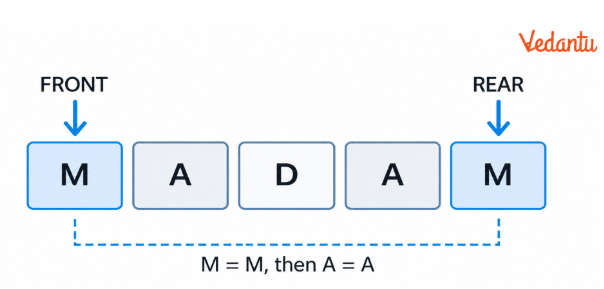
At each step, the first and last characters are compared and removed. The middle D remains after both matching pairs are removed.
Conclusion: MADAM is a palindrome because the characters match when compared from both ends.
Q14. Write a Python program to perform INSERTFRONT, INSERTREAR, DELETIONFRONT and DELETIONREAR operations on a Deque.
Answer: A Deque allows insertion and deletion at either end. Python lists can represent a Deque using insert(), append() and pop().
Program:
def insertFront(dq, item):
dq.insert(0, item)
def insertRear(dq, item):
dq.append(item)
def deletionFront(dq):
if len(dq) == 0:
print("Deque Underflow")
return None
return dq.pop(0)
def deletionRear(dq):
if len(dq) == 0:
print("Deque Underflow")
return None
return dq.pop()
def getFront(dq):
if len(dq) == 0:
return None
return dq[0]
def getRear(dq):
if len(dq) == 0:
return None
return dq[-1]
myDeque = []
insertRear(myDeque, 20)
insertRear(myDeque, 30)
insertFront(myDeque, 10)
insertRear(myDeque, 40)
print("Deque:", myDeque)
print("Front:", getFront(myDeque))
print("Rear:", getRear(myDeque))
print("Deleted from Front:", deletionFront(myDeque))
print("Deleted from Rear:", deletionRear(myDeque))
print("Final Deque:", myDeque)
Output:
Deque: [10, 20, 30, 40]
Front: 10
Rear: 40
Deleted from Front: 10
Deleted from Rear: 40
Final Deque: [20, 30]
Explanation:
insertFront() inserts an element at index 0.
insertRear() appends an element to the end.
getFront() and getRear() return the elements at the two ends without removing them.
deletionFront() removes the first element.
deletionRear() removes the last element.
The program checks whether the Deque is empty before deletion to avoid underflow.
Difference Between Queue and Deque Operations
Q15. Write a menu-driven Python program using a Queue to manage shuttlecocks stored in a box.
Answer: A Queue can represent a box where shuttlecocks are added at one end and removed from the other. The first shuttlecock added will be removed first.
The following program allows the user to add a shuttlecock, remove one, view the next shuttlecock, display the queue, and exit.
Program:
shuttleQueue = []
while True:
print("\n1. Add Shuttlecock")
print("2. Remove Shuttlecock")
print("3. View Next Shuttlecock")
print("4. Display Queue")
print("5. Exit")
choice = input("Enter your choice: ")
if choice == "1":
code = input("Enter shuttlecock code: ")
shuttleQueue.append(code)
print("Shuttlecock added")
elif choice == "2":
if len(shuttleQueue) == 0:
print("Queue Underflow")
else:
removed = shuttleQueue.pop(0)
print("Removed:", removed)
elif choice == "3":
if len(shuttleQueue) == 0:
print("Queue is empty")
else:
print("Next Shuttlecock:", shuttleQueue[0])
elif choice == "4":
print("Queue:", shuttleQueue)
elif choice == "5":
print("Program Ended")
break
else:
print("Invalid Choice")
Sample Interaction:
Enter your choice: 1
Enter shuttlecock code: S1
Shuttlecock added
Enter your choice: 1
Enter shuttlecock code: S2
Shuttlecock added
Enter your choice: 3
Next Shuttlecock: S1
Enter your choice: 2
Removed: S1
Enter your choice: 4
Queue: ['S2']
Enter your choice: 5
Program Ended
Explanation:
The program creates an empty Queue using a Python list.
Each shuttlecock is identified by a code such as S1 or S2.
The ENQUEUE operation adds shuttlecocks at the REAR.
The DEQUEUE operation removes the shuttlecock at the FRONT.
PEEK displays the next shuttlecock without removing it.
The menu repeats until the user selects Exit.
Key Learning: This program shows how FIFO is applied to a practical situation through menu-driven Python programming.
How are Queue and Deque Used in Class 12 Computer Science Chapter 4?
Queues help process tasks in the order they arrive, such as print jobs, customer requests and waiting lists. A Deque provides more flexibility by allowing operations at both ends. Vedantu's Class 12 Computer Science Chapter 4 Important Questions help students practise these concepts through Queue operations and Python programs.
How to Practise Class 12 Computer Science Chapter 4 Important Questions Effectively?
Trace Queue operations: Write the contents after each ENQUEUE and DEQUEUE.
Identify FRONT and REAR: Check which element enters and leaves the Queue.
Practise Python programs: Implement Queue and Deque operations using lists.
Solve Deque problems: Compare elements at both ends to check palindromes.
Avoid common mistakes: Check for empty Queues and use the correct deletion index.
Regular practice helps students understand FIFO, handle Queue operations and solve Python programming questions accurately.
Add links to all the tables.
Important Study Material Links for Class 12 Computer Science Chapter 4
Students can revise Queue and Deque concepts using these chapter-specific solutions and notes.
Class 12 Computer Science Chapter-Wise Important Questions
Explore important questions from other Computer Science chapters to revise Python programming and related concepts.
Additional Study Materials for Class 12 Computer Science
FAQs on Important Questions and Answers for Class 12 Computer Science Chapter 4 Queue | 2026-27
1. Where can I download Class 12 Computer Science Chapter 4 Important Questions PDF?
Students can access Vedantu's Class 12 Computer Science Chapter 4 Important Questions PDF resources for revision. The questions cover FIFO, ENQUEUE, DEQUEUE, Queue implementation, Deque operations and palindrome programs. Use the Class 12 Computer Science Chapter 4 Important Questions PDF download option when the downloadable question paper is available on the page.
2. Why does a Queue follow FIFO instead of LIFO from Class 12 Computer Science Chapter 4 Important Questions?
A Queue adds new elements at the REAR and removes existing elements from the FRONT. Therefore, it removes the first element first. Unlike a Stack, which follows LIFO, a Queue processes elements in the order they arrive.
3. What is the difference between pop() and pop(0) when implementing a Queue in Python?
The pop() method removes the last element of a Python list, while pop(0) removes its first element. In the textbook's list-based Queue implementation, pop(0) is used for DEQUEUE because the FRONT is stored at index 0.
4. What types of MCQs are useful for Class 12 Computer Science Chapter 4?
Class 12 Computer Science Chapter 4 important questions MCQ practice can include FIFO identification, FRONT and REAR positions, Python list operations, underflow conditions and tracing Queue contents after multiple operations. These questions help students check their understanding of Queue and Deque behaviour.
5. What happens when DEQUEUE is performed on an empty Queue?
Attempting DEQUEUE on an empty Queue results in an underflow condition. In Python, calling pop(0) on an empty list raises an IndexError. Students can prevent this by checking len(queue) == 0 before removing an element.
6. Does the PEEK operation remove an element from a Queue in Class 12 Computer Science Chapter 4 Queue?
No. PEEK only returns or displays the element at the FRONT without deleting it. In a list-based Queue, queue[0] can be used after checking that the Queue is not empty.
7. How is a Deque different from a normal Queue?
A normal Queue inserts elements at the REAR and removes them from the FRONT. A Deque allows insertion and deletion at both ends, making it suitable for operations that require more flexible access.
8. Can a Deque behave like both a Stack and a Queue from Class 12 Computer Science Chapter 4?
Yes. A Deque can act like a Stack when you insert and delete at the same end. It can act like a Queue when insertion and deletion take place at opposite ends.
9. How can a Deque check whether a string is a palindrome?
A Deque stores the string's characters in order. The program removes one character from the FRONT and one from the REAR, then compares them. If every pair matches until zero or one character remains, the string is a palindrome.
10. Why are Queues used in printer management and customer service systems?
Queues help manage requests that need to be processed in order. For example, a shared printer can process print jobs in their arrival order, while a customer service system can place callers in a waiting Queue until an agent becomes available.