









WordPad vs Notepad features uses and key differences for exams
In basic computer studies, text editors play an important role in creating and editing documents. Two commonly used text editing programs in Windows are Notepad and WordPad. Although both are used to write and edit text, they differ in features, formatting options, and file support. Understanding the Difference Between WordPad And Notepad helps students choose the right tool for simple text writing, coding, or document formatting tasks. These applications are often introduced in computer fundamentals and are essential for learning how text processing works in an operating system.
Definition and Meaning
Notepad and WordPad are basic text editing applications available in the Microsoft Windows operating system. They allow users to create, open, edit, and save text documents, but they differ in formatting capabilities and supported file types.
- Notepad - A simple text editor used to create plain text files without formatting.
- WordPad - A basic word processor that allows text formatting such as bold, italic, font changes, and paragraph alignment.
- Plain Text - Text without styling or formatting.
- Rich Text - Text that includes formatting like font styles, colors, and alignment.
How It Works
Both Notepad and WordPad work as text editing software within the Windows environment. They allow users to input text using the keyboard and save it as a file on the computer.
- The user opens the application from the Start menu.
- Text is entered using the keyboard.
- Editing options such as copy, paste, undo, and redo are used.
- The document is saved using the Save or Save As option.
- The file is stored in a chosen location with a specific file extension.
The main difference in their working lies in formatting capabilities. Notepad handles only plain text, while WordPad processes formatted text using Rich Text Format.
Types and Classification
Text editing software can be classified based on functionality and formatting support.
- Plain Text Editors - Example: Notepad. Used for coding and simple text writing.
- Basic Word Processors - Example: WordPad. Used for formatted documents.
- Advanced Word Processors - Example: Microsoft Word. Provide advanced formatting and layout tools.
Features and Characteristics
The Difference Between WordPad And Notepad becomes clearer when we compare their features.
Notepad Features
- Supports only plain text.
- Saves files in .txt format by default.
- Lightweight and fast.
- Commonly used for programming and scripting.
- No advanced formatting tools.
WordPad Features
- Supports rich text formatting.
- Allows font style, size, and color changes.
- Supports file formats like .rtf, .docx, and .txt.
- Provides paragraph alignment options.
- Can insert images in documents.
Difference Between WordPad And Notepad
| Feature | Notepad | WordPad |
|---|---|---|
| Type | Plain Text Editor | Basic Word Processor |
| Formatting | No formatting options | Supports formatting |
| Default File Format | .txt | .rtf |
| Image Support | Not supported | Supported |
| Common Use | Coding and scripts | Simple documents |
The table above clearly highlights the Difference Between WordPad And Notepad in terms of functionality, formatting, and usage.
User Interface Examples
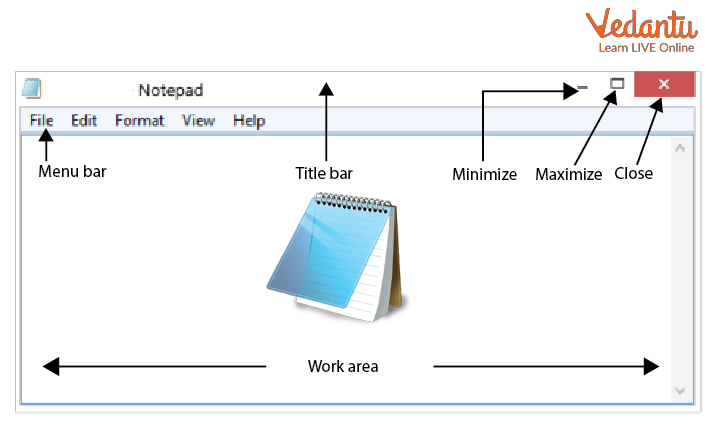
Notepad Interface:
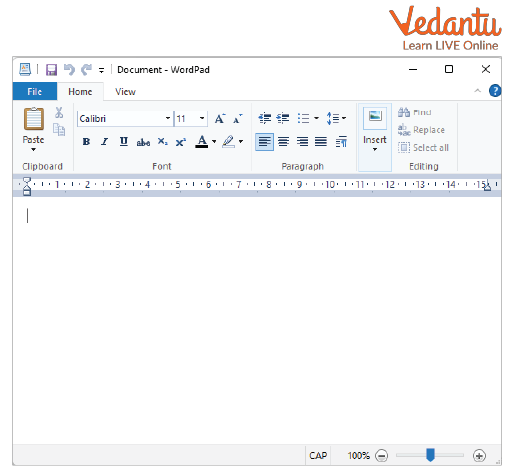
WordPad Interface:
Horizontal and Vertical Scroll Bars:

Advantages
Advantages of Notepad
- Very simple and easy to use.
- Consumes minimal system resources.
- Ideal for writing code and configuration files.
Advantages of WordPad
- Supports formatted text documents.
- Allows insertion of images.
- More features than Notepad while remaining simple.
Disadvantages / Limitations
Notepad Limitations
- No text formatting options.
- Cannot insert images or tables.
WordPad Limitations
- Lacks advanced features like spell check and templates.
- Not suitable for complex professional documents.
Applications and Use Cases
- Notepad applications - Writing HTML, CSS, JavaScript code; editing configuration files; creating plain text notes.
- WordPad applications - Preparing simple letters, assignments, formatted notes, and basic reports.
- Used in schools to teach basic text editing skills.
Quick Facts
| Feature | Notepad | WordPad |
|---|---|---|
| Developed By | Microsoft | Microsoft |
| Platform | Windows | Windows |
| File Extension | .txt | .rtf |
| Used For | Plain text editing | Basic document formatting |
These quick facts summarize the essential technical differences and uses of both applications.
Interesting Facts About Difference Between WordPad And Notepad
- Notepad was first introduced in Windows 1.0.
- WordPad replaced Microsoft Write in later versions of Windows.
- Programmers often prefer Notepad for editing source code.
- WordPad supports basic Rich Text Format editing.
- Both applications are lightweight compared to full word processors.
- Notepad files are universally readable across platforms.
Conclusion
Understanding the Difference Between WordPad And Notepad is essential in computer fundamentals. While Notepad is ideal for plain text editing and coding, WordPad is suitable for creating simple formatted documents. Both tools serve important purposes in daily computer usage and education. Learning their features, advantages, and applications helps students select the right software for specific tasks and builds a strong foundation in text processing concepts in computer science.
FAQs on Difference Between WordPad and Notepad in Windows
1. What is the main difference between WordPad and Notepad?
The main difference between WordPad and Notepad is that WordPad is a basic word processing software with formatting features, while Notepad is a simple plain text editor used mainly for coding and text editing.
- WordPad supports rich text formatting like bold, italics, fonts, and images.
- Notepad supports only plain text without formatting.
- WordPad is used for simple documents, while Notepad is widely used in programming and configuration files.
2. What is Notepad in Computer Science?
Notepad is a basic text editor in the Windows operating system used to create and edit plain text files without formatting.
- Saves files in formats like .txt, .html, .css, .py.
- Commonly used for coding, scripting, and configuration files.
- Lightweight and fast with minimal system requirements.
3. What is WordPad in Computer Science?
WordPad is a basic word processing application included in Windows that allows users to create formatted text documents.
- Supports Rich Text Format (RTF) and basic .docx files.
- Allows text formatting such as font style, size, alignment, and images.
- Used for creating letters, notes, and simple reports.
4. Which is better for programming: WordPad or Notepad?
Notepad is better for programming because it works with plain text and does not add hidden formatting codes.
- Ideal for writing HTML, CSS, JavaScript, Python and other code.
- Prevents formatting errors in source code.
- WordPad may insert rich text formatting that can break programs.
5. What file formats are supported by WordPad and Notepad?
WordPad and Notepad support different file formats based on their functionality as text editors.
- Notepad: .txt, .html, .css, .js, .xml, and other plain text formats.
- WordPad: .rtf, .docx (basic support), .txt, .odt (limited support depending on version).
- Notepad saves only plain text, while WordPad supports formatted documents.
6. What are the features of WordPad and Notepad?
WordPad and Notepad have different features based on their purpose in the operating system.
- Notepad Features: plain text editing, word wrap, find and replace, lightweight interface.
- WordPad Features: font styling, paragraph alignment, image insertion, basic document formatting.
- WordPad is closer to a simple word processor, while Notepad is a code-friendly text editor.
7. What are the advantages and disadvantages of Notepad?
Notepad is a simple and efficient text editor but lacks advanced development features.
- Advantages: fast, lightweight, easy to use, ideal for coding basics and configuration files.
- Disadvantages: no syntax highlighting, no auto-completion, limited formatting tools.
- Not suitable for large-scale software development compared to modern IDEs.
8. What are the advantages and disadvantages of WordPad?
WordPad provides basic word processing features but lacks advanced document tools.
- Advantages: supports formatted text, simple interface, suitable for short documents.
- Disadvantages: limited advanced formatting, not ideal for professional publishing.
- Not suitable for programming or structured source code editing.
9. Is WordPad a text editor or a word processor?
WordPad is considered a basic word processor because it supports formatted text and document styling.
- Allows font changes, paragraph alignment, and image insertion.
- More advanced than Notepad but simpler than Microsoft Word.
- Used for small-scale document creation in Windows.
10. Why is Notepad commonly used in exam preparation and interviews?
Notepad is commonly used in exams and interviews because it helps learners focus on core programming logic without advanced IDE assistance.
- Encourages understanding of syntax and manual debugging.
- Useful for writing basic algorithms and small programs.
- Frequently referenced in school-level and competitive Computer Science exams.
