


Class 12 Computer Science Chapter 13 Important Questions with Answers PDF Download
Project Based Learning focuses on solving practical problems by planning tasks, dividing work among team members and combining individual solutions. The following 15 questions include MCQs, very short, short and long answers based on the chapter's project-development steps, teamwork principles and application examples.
Class 12 Computer Science Chapter 13 MCQ with Answers
Q1. A group of students wants to develop an application for organising a school seminar. What should be their first step according to Project-Based Learning?
(a) Assign programming tasks to team members
(b) Identify the project and understand its usefulness
(c) Prepare the final project report
(d) Combine all the completed modules
Answer: (b) Identify the project and understand its usefulness.
Explanation: Project-Based Learning begins with identification of a project. Students first recognise the problem, understand why the project is needed and consider its expected impact before preparing a detailed plan.
Q2. A restaurant billing project is divided into customer login, order entry, bill generation and sales reporting. Which approach is being followed?
(a) Random approach
(b) Modular approach
(c) Sequential searching
(d) Network approach
Answer: (b) Modular approach.
Explanation: In a modular approach, a large project is divided into smaller, manageable units. Each module performs a specific task and produces an output that can be integrated into the complete application.
Q3. In the restaurant automation project described in Chapter 13, when should the daily Order Number start again from 1?
(a) Whenever a customer logs in
(b) Whenever the manager changes the menu
(c) At the beginning of each day
(d) Whenever an order is cancelled
Answer: (c) At the beginning of each day.
Explanation: The textbook specifies that order numbering begins from 1 each day. However, each saved bill must still have a unique identification, which can be formed using the date and daily order number.
Q4. In the “Match the Sum” educational game, when should selected digits be removed from the displayed cells?
(a) When their sum is 5
(b) When exactly four digits are selected
(c) When two or three selected digits add up to 10
(d) Whenever a new digit is generated
Answer: (c) When two or three selected digits add up to 10.
Explanation: The game allows children to select two or three displayed digits. If their sum equals 10, the selected digits are removed. This activity helps children practise basic addition.
Class 12 Computer Science Chapter 13 Very Short Answer Questions
Q5. What is Project-Based Learning? Mention two skills students can develop through it.
Answer: Project-Based Learning is a method of learning in which students work on a practical problem and develop a solution through planned activities.
Two skills students develop are:
Problem-solving: Identifying difficulties and finding suitable solutions.
Teamwork: Working with others and sharing responsibilities to complete a project.
It also helps students improve decision-making, investigation and time management.
Q6. What is a module in a computer science project? Give one example.
Answer: A module is a smaller, well-defined part of a project that performs a particular task using specified inputs and produces an output.
Example: In a restaurant order-processing application, the bill-generation module calculates the total amount for the items ordered.
Separating tasks into modules makes the overall project easier to manage and develop.
Q7. Name the six components of teamwork discussed in Chapter 13.
Answer: The six components of teamwork are:
Communicate with others.
Listen to others.
Share with others.
Respect others.
Help others.
Participate actively.
These components help team members coordinate their work and contribute towards completing a common task.
H3-Class 12 Computer Science Chapter 13 Short Answer Questions
Q8. Differentiate between the modular, top-down and bottom-up approaches used for solving projects.
Answer: Chapter 13 introduces modular, top-down and bottom-up approaches for project development.
Explanation: All three approaches support organised project development. The modular approach focuses on dividing work into units, while top-down and bottom-up describe two ways of organising development.
Q9. A team is preparing an application for a school event. Arrange the following activities in the correct order and explain their purpose.
Activities:
(a) Guidance and monitoring
(b) Outcome of the project
(c) Identification of the project
(d) Fixing a time frame and processing
(e) Defining a plan
Answer: The correct order is:
(c) Identification of the project
(e) Defining a plan
(d) Fixing a time frame and processing
(a) Guidance and monitoring
(b) Outcome of the project
Explanation:
Visual: Steps in Project-Based Learning
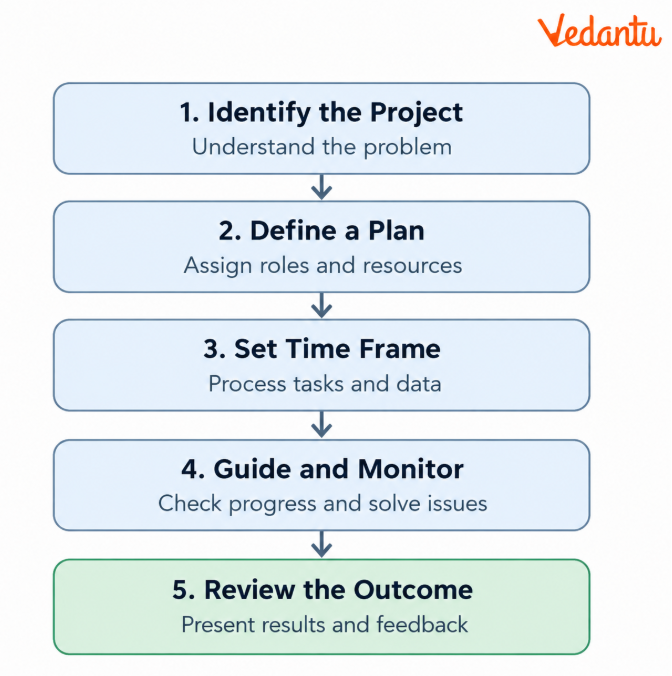
Key Learning: Planning and monitoring are connected activities. If a problem is identified during development, the team may need to revisit its plan before completing the project.
Q10. Explain why communication, listening and sharing are important when students work together on a project.
Answer: Successful teamwork depends not only on technical skills but also on how team members work with one another.
Communication: Team members must regularly discuss their progress, responsibilities and problems. They can communicate through meetings, email or other suitable methods.
Listening: Members should listen carefully to one another's suggestions and consider different solutions before making decisions.
Sharing: Team members should share useful ideas, resources, tools and technical knowledge. This prevents unnecessary repetition of work and improves coordination.
Example: In a restaurant automation project, a student developing the billing module must communicate with the student developing the order-entry module. Both should agree on how item codes, quantities and prices will be passed between the modules.
Conclusion: Communication, listening and sharing help students coordinate tasks, resolve difficulties and integrate their work into a complete project.
Q11. Study the following requirements of a restaurant order-processing project and identify the suitable module for each task.
Requirements:
(a) Customers enter item codes and quantities.
(b) The manager adds or changes menu items.
(c) The application displays a bill with an order number.
(d) The manager generates a sales summary for a selected date.
(e) A customer or manager enters the application through the appropriate login.
Answer:
Explanation: Each module handles a specific part of the application. When combined, these modules support the restaurant's order-processing workflow described in the textbook.
Class 12 Computer Science Chapter 13 Long Answer Questions
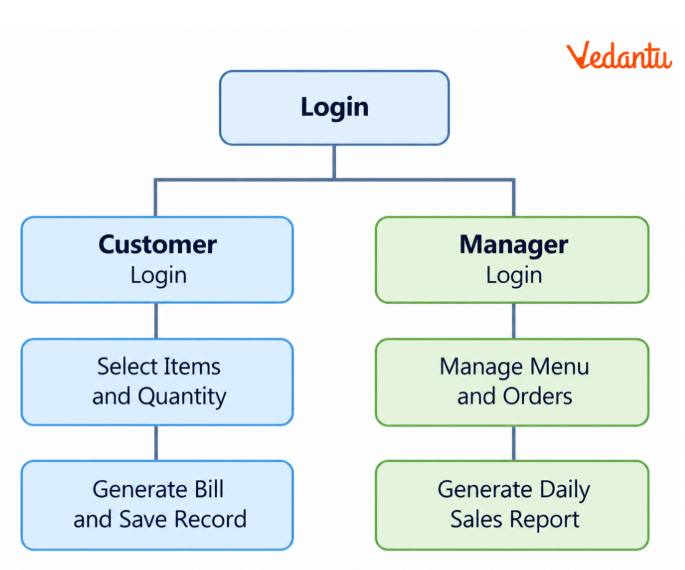
Q12. Design a restaurant order-processing application based on the “Stay Healthy” restaurant project. Explain its modules, billing requirements and reporting functions.
Answer: The restaurant automation project aims to simplify order placement, billing and record management through a computer application.
According to the chapter, the restaurant requires separate customer and manager login options, customer ordering kiosks, unique bills and sales reporting.
Part A: Identify the main modules
Part B: Explain the order-processing flow
Part C: Calculate a sample bill
Suppose the restaurant offers the following items:
Formula:
Amount =Price × Quantity
TotalBill = 160 + 150 + 60 = ₹370
Part D: Create a unique bill identifier
The textbook specifies that the order number begins at 1 each day.
For example:
Date: 2026-10-13
Daily Order Number: 5
Unique Bill ID: 20261013-005
A date-based bill ID prevents the same daily order number from being confused with an order placed on another date.
Part E: Manager reports
The application should support a sales summary for a selected date. An additional useful report could show total sales by menu item.
Conclusion: This project demonstrates how a practical application can be divided into modules for user access, data entry, billing, record storage and reporting.
Q13. Explain how to develop the puzzle game described in Chapter 13. Write the rules, identify the main modules and illustrate the game with a sample grid.
Answer: Chapter 13 describes a puzzle based on finding safe cells in a grid containing hidden bombs. The player must clear safe cells without selecting a bomb.
The textbook suggests a 6 × 6 grid containing 6 bombs to keep the initial project manageable.
Part A: Game requirements
Display a grid of 6 rows and 6 columns.
Place 6 bombs in different cells.
Allow the player to select a cell.
End the game if a selected cell contains a bomb.
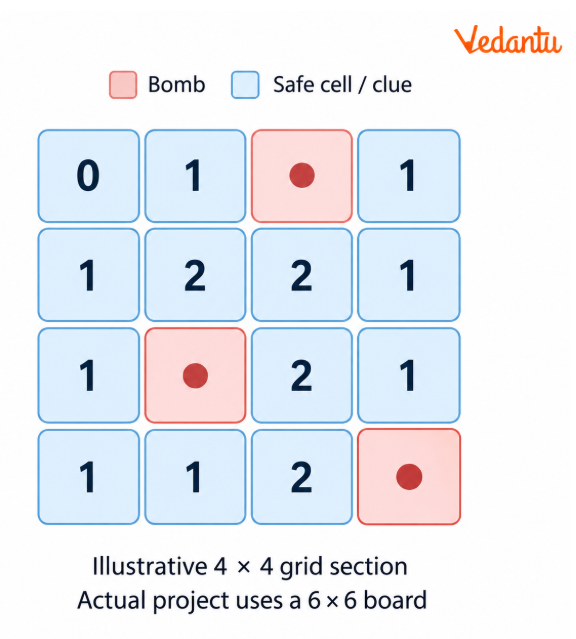
If the selected cell is safe, display a number showing how many bombs are present in its adjacent cells.
Handle invalid selections and other program errors.
Part B: Suggested project modules
Part C: Understand the clue numbers
Consider a sample 4 × 4 portion of a larger game board.
Part D: Explain the program logic
START
Create a 6 × 6 board
Place 6 bombs in different cells
WHILE the game is active:
Accept the player's row and column
IF the selected position is invalid:
Ask for another position
ELSE IF the cell contains a bomb:
Display "Game Over"
End the game
ELSE:
Count bombs in adjacent cells
Display the clue number
IF all safe cells are cleared:
Display "You Win"
End the game
STOP
Part E: Important testing cases
The player selects a bomb.
The player selects a safe cell with no adjacent bombs.
The player selects a safe cell with multiple adjacent bombs.
The player enters a row or column outside the grid.
The player selects an already revealed cell.
All safe cells have been revealed.
Explanation: The project brings together grid handling, conditional statements, repetition, user input and exception handling. Breaking the game into modules makes it easier to develop and test.
Q14. Design the “Match the Sum” educational game described in Chapter 13. Explain how digits are generated, moved and removed.
Answer: “Match the Sum” is an educational game proposed for children aged 5–7 years. Its aim is to develop addition skills by allowing players to select two or three digits whose total is 10.
Part A: Requirements from the textbook
Part B: Example of a successful selection
Suppose the displayed digits include:
[2] [7] [3] [5] [8] [1] [4]
A student selects 2, 3 and 5.
2 + 3 + 5 = 10
Since the sum is 10, the selected digits are removed.
The remaining sequence becomes:
[7] [8] [1] [4]
The program can then continue generating and inserting new digits.
Part C: Example of an unsuccessful selection
Suppose a student selects:
4 + 2 + 3 = 9
Since the result is not 10, the selection should not remove those digits.
Part D: Python function for checking the selected digits
The following function demonstrates one part of the game logic.
def check_sum(selected_digits):
if len(selected_digits) not in (2, 3):
return False
for digit in selected_digits:
if digit < 1 or digit > 9:
return False
return sum(selected_digits) == 10
print(check_sum([2, 3, 5]))
print(check_sum([4, 2, 3]))
print(check_sum([7, 3]))
Output:
True
False
True
Explanation:
[2, 3, 5] contains three valid digits that add up to 10.
[4, 2, 3] adds up to 9, so it is not a correct match.
[7, 3] contains two valid digits whose sum is 10.
This function validates the sum. A complete game must also check that the selected digits actually exist in the displayed cells before removing them.
Part E: Important situations to handle
The user selects fewer than two or more than three digits.
The selected digits do not add up to 10.
The user selects an empty cell.
A digit already selected is selected again.
All 15 cells become occupied, leaving no space for the next digit.
Conclusion: The “Match the Sum” project combines lists, random number generation, input checking and simple mathematical logic to create an interactive learning activity.
Q15. A team of five students is assigned to develop the restaurant automation project. Prepare a project plan covering responsibilities, time management, guidance, monitoring and outcomes.
Answer: A successful computer science project needs proper task allocation, coordinated teamwork and regular monitoring.
Consider a team developing the “Stay Healthy” restaurant order-processing application.
Part A: Assign responsibilities
Part B: Prepare an illustrative project schedule
This four-week schedule is an example of applying the textbook's time-planning principle, not a prescribed duration.
Part C: Explain guidance and monitoring
The project leader checks whether assigned tasks are being completed.
Team members communicate difficulties during meetings.
The guide teacher provides suggestions when the team cannot solve a problem.
Errors identified during testing are corrected.
Changes are discussed before they are included in the application.
Part D: Identify testing situations
Part E: Describe the outcome
The project should produce a working restaurant order-processing application that supports customer ordering, manager functions, billing and sales reports.
After testing, the team should present the application, explain the work completed by each member and make improvements based on feedback.
Conclusion: This project demonstrates the relationship between planning, modular development, teamwork, testing and evaluation. A good project is not merely a working program; it is the result of an organised development process.
Key Concepts to Revise in Class 12 Computer Science Chapter 13 – Vedantu's Learning Guide
Project-Based Learning teaches students how to turn an idea into a practical solution. Vedantu's Class 12 Computer Science Chapter 13 Important Questions focus on project planning, teamwork, modular development and the three application examples given in the textbook.
How to Prepare Class 12 Computer Science Chapter 13 Important Questions for Exams?
Revise the five project stages: Practise explaining the sequence from identifying a project to reviewing its outcome.
Understand project modules: Divide the restaurant application into login, ordering, billing and reporting functions.
Work through game examples: Study the rules of the puzzle and “Match the Sum” applications.
Practise case-based answers: Identify appropriate modules, team roles and solutions from a given situation.
Use diagrams and tables: Present project workflows, task allocation and application requirements clearly.
Students should focus on explaining how a project works rather than memorising definitions alone. This will help them answer both theory and application-based questions.
Important Study Material Links for Class 12 Computer Science Chapter 13
Class 12 Computer Science Chapter-Wise Important Questions
Students looking for Class 12 Computer Science chapter-wise questions and Answers PDF resources can use the following chapter list to organise their revision and practise topics from across the textbook.
Additional Study Materials for Class 12 Computer Science
FAQs on Important Questions and Answers for Class 12 Computer Science Chapter 13 Project-Based Learning | 2026-27
1. How can students choose a suitable project for Class 12 Computer Science Chapter 13?
Students should select a practical problem they can solve using their programming skills and available resources. Before starting, they should identify the project's purpose, required features, time frame and expected outcome. Chapter 13 includes examples such as restaurant order processing, a puzzle game and the “Match the Sum” educational game.
2. What types of MCQs are useful for Class 12 Computer Science Chapter 13?
Class 12 Computer Science Chapter 13 important questions MCQ practice should cover the correct sequence of project-development stages, identification of modular approaches, teamwork components and project-specific requirements. For example, you may be asked how many cells are used in “Match the Sum” or which function belongs to the restaurant's manager login.
3. What are the five main steps involved in Project-Based Learning?
The five steps are identifying a project, defining a plan, fixing a time frame and process, providing guidance and monitoring, and reviewing the project outcome. These steps help a team work systematically from an initial idea to a completed solution.
4. Why is the modular approach useful for the restaurant order-processing project?
The modular approach divides the application into smaller functions such as login, menu management, order entry, billing and sales reporting. Students can develop and test these parts separately before combining them into the complete application.
5. What is the difference between the top-down and bottom-up approaches in project development?
The top-down approach begins with the complete problem and breaks it into smaller tasks. The bottom-up approach begins with smaller components and combines them to build the complete system. Both are ways to organise project development.
6. Why must every restaurant bill have a unique identification number?
A unique bill identifier helps the restaurant distinguish one transaction from another. In the textbook project, daily order numbers begin from 1, so combining the date with the order number is one possible way to distinguish bills created on different days.
7. What should happen when a player selects a bomb in the puzzle project?
According to the project specifications, the game ends when the selected cell contains a bomb. If the cell is safe, the game displays a number indicating how many bombs are hidden in adjacent cells.
8. How does the “Match the Sum” project help children improve mathematical skills?
The game encourages children to identify two or three displayed digits whose sum equals 10. Correctly selected digits are removed from the list. Repeated practice helps develop addition skills through an interactive activity.
9. Why are teamwork and monitoring necessary when students develop a computer science project?
Teamwork allows students to share ideas, responsibilities and technical knowledge. Monitoring helps the project leader and guide teacher check progress, identify problems and provide support. Both are important when different modules must be completed and integrated.
10. Where can I get Class 12 Computer Science Chapter 13 Important Questions PDF with Answers?
Students can use this page to practise Class 12 Computer Science Chapter 13 Important Questions and Answers covering project planning, teamwork and practical applications. The Class 12 Computer Science Chapter 13 Important Questions and Answers PDF can be downloaded once it is published on the page.