


Class 12 Computer Science Chapter 12 Important Questions with Answers PDF Download
The Class 12 Computer Science Chapter 12 Important Questions and Answers cover important security concepts through 15 solved questions, including MCQs, very short, short and long answers. Students can practise identifying malware, comparing security measures and understanding how common network threats affect computers and personal information.
Class 12 Computer Science Chapter 12 MCQ with Answers
Q1. Which type of malware can spread across a network without attaching itself to a host program?
(a) Trojan
(b) Worm
(c) Adware
(d) Spyware
Answer: (b) Worm
Explanation: A worm is standalone malware that can replicate itself and spread through network connections. Unlike a virus, it does not need to attach its code to another executable file.
Q2. A student downloads an application that looks like a useful program. After installation, it secretly gives an unauthorised person access to the computer. Which malware is most likely responsible?
(a) Ransomware
(b) Computer worm
(c) Trojan
(d) Adware
Answer: (c) Trojan
Explanation: A Trojan disguises itself as legitimate software to trick users into installing it. Some Trojans create backdoors that allow unauthorised access to a system.
Q3. Which antivirus technique executes a suspicious application in an isolated virtual environment to observe its behaviour?
(a) Signature-based detection
(b) Sandbox detection
(c) Cookie tracking
(d) Spam filtering
Answer: (b) Sandbox detection
Explanation: Sandbox detection runs a suspicious application in an isolated virtual environment. Its behaviour is observed to identify possible threats without giving the application direct access to the main system's resources.
Q4. What is the main security advantage of HTTPS over HTTP?
(a) HTTPS completely prevents malware infections.
(b) HTTPS automatically deletes browser cookies.
(c) HTTPS encrypts data transmitted between the browser and server.
(d) HTTPS prevents all websites from collecting user information.
Answer: (c) HTTPS encrypts data transmitted between the browser and server.
Explanation: HTTPS uses encryption, commonly through TLS, to protect information exchanged between a browser and a website. It reduces the risk of transmitted data being read or modified by unauthorised parties. However, HTTPS alone does not guarantee that a website is trustworthy.
Class 12 Computer Science Chapter 12 Very Short Answer Questions
Q5. What is malware? Give four examples.
Answer: Malware means malicious software. It is software designed to damage a computer, steal information, disrupt operations or gain unauthorised access.
Four examples are:
Virus: Infects other executable files or programs.
Worm: Spreads independently, often through networks.
Ransomware: Blocks or encrypts data and demands payment.
Spyware: Secretly collects information about a user.
Q6. What is the difference between a network firewall and a host-based firewall?
Answer:
Network firewall: Monitors and controls traffic moving between networks.
Host-based firewall: Monitors traffic entering or leaving an individual computer.
Both use security rules to help prevent unauthorised network communication.
Q7. What are session cookies and authentication cookies?
Answer:
Session cookies help a website maintain information during a browsing session, such as a temporary login session or shopping activity.
Authentication cookies help a website recognise that a user has logged in, allowing the user to move between pages without signing in repeatedly.
Cookies support website functionality, but some can also be used to track browsing activity.
Class 12 Computer Science Chapter 12 Short Answer Questions
Q8. Differentiate between a computer virus, worm, Trojan and ransomware.
Answer:
Explanation: These threats belong to the malware category, but their methods differ. Viruses commonly depend on infected programs, worms replicate independently, Trojans rely on deception, and ransomware focuses on extortion.
Q9. A computer becomes unusually slow, displays unwanted pop-ups and starts opening unknown programs. Identify possible signs of infection and suggest preventive measures.
Answer: These symptoms may indicate a malware infection, although they can also have other causes.
Possible signs of malware infection:
The computer becomes unusually slow or crashes frequently.
Unknown pop-up windows appear.
Unrecognised programs start automatically.
Browser settings change without the user's permission.
Files appear or disappear unexpectedly.
Preventive measures:
Keep antivirus software and its threat definitions updated.
Install operating system and software security updates.
Avoid opening suspicious email links and attachments.
Scan removable storage devices before accessing files.
Download applications only from trusted sources.
Back up important files regularly.
Explanation: Preventive security measures reduce the chances of infection and help protect important data.
Q10. Differentiate between HTTP and HTTPS. Why should HTTPS be preferred when entering personal or banking information?
Answer:
Why is HTTPS preferred?
When students enter passwords, personal details or payment information, HTTPS helps protect the data while it travels across the network.
Example:
http://example.com
https://example.com
The second address indicates an encrypted HTTPS connection. Students should still verify the website's identity, because fraudulent websites can also use HTTPS.
Q11. Compare White Hat, Black Hat and Grey Hat hackers with examples of their activities.
Answer:
Explanation: The main distinction is the person's intention and whether the activity is authorised. White Hat hackers work ethically with permission, while Black Hat hackers deliberately misuse security weaknesses. Grey Hat activities may still violate rules or laws even when the intention is not to cause harm.
Class 12 Computer Science Chapter 12 Long Answer Questions
Q12. Explain five methods used by antivirus software to identify malware.
Answer: Antivirus software helps detect, prevent and remove malicious programs. Chapter 12 describes different methods used to identify potential threats.
Explanation:
Signature-based detection: Antivirus software checks files against known malware signatures. Its database must be updated regularly because newly discovered threats may not match old signatures.
Sandbox detection: Suspicious files are tested in an isolated environment. This helps identify harmful behaviour before allowing the application to interact with the main system.
Data mining techniques: Data analysis and machine learning methods examine file characteristics to identify possible malware.
Heuristic detection: A program is examined for code patterns that resemble previously identified threats. This may detect some new or modified malware.
Real-time protection: Antivirus software runs in the background and monitors suspicious activities while programs execute.
Conclusion: These methods complement one another. Antivirus protection is more effective when security software is regularly updated and used alongside safe browsing and downloading practices.
Q13. Explain how a firewall protects a school computer network. Differentiate between network and host-based firewalls with a suitable diagram.
Answer: A firewall is a security system that monitors network traffic and permits or blocks communication according to predefined security rules.
Consider a school that has a computer lab, an administrative office and a finance server. The school wants students to access learning websites but prevent unauthorised access to confidential financial records.
The network administrator can configure firewall rules to restrict traffic to protected resources while allowing authorised communication.
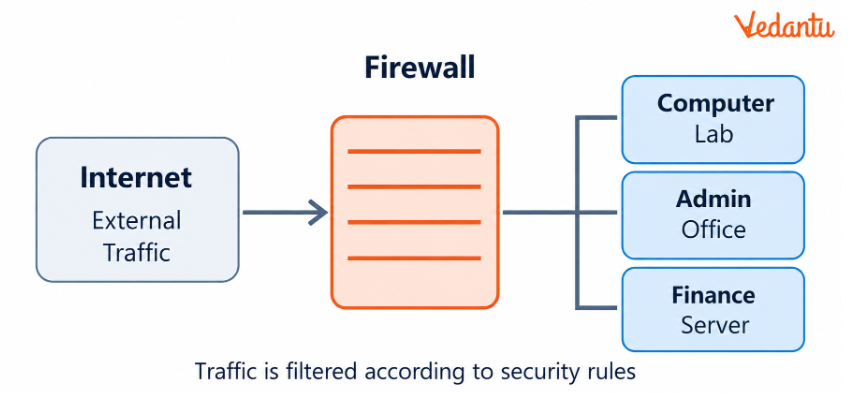
How a firewall helps:
It monitors traffic entering and leaving the protected network.
It checks communication against configured security rules.
It can block unauthorised access to restricted servers.
It can limit unwanted connections and network activity.
It helps reduce exposure to certain network-based threats.
Types of Firewalls
Conclusion: A school may use both network and host-based firewalls. However, firewalls do not replace antivirus software, security updates or responsible computer use.
Q14. Differentiate between DoS and DDoS attacks. Explain how a DDoS attack affects a website using a diagram.
Answer: Denial of Service (DoS) and Distributed Denial of Service (DDoS) are network attacks intended to make a service or resource unavailable to authorised users.
Difference Between DoS and DDoS
Example:
Suppose an examination-result website can handle only a limited number of requests at a time. During a DDoS attack, many compromised computers send excessive requests to that website.
The server becomes overloaded and may be unable to respond to genuine students trying to check their results.
Diagram: Distributed Denial of Service
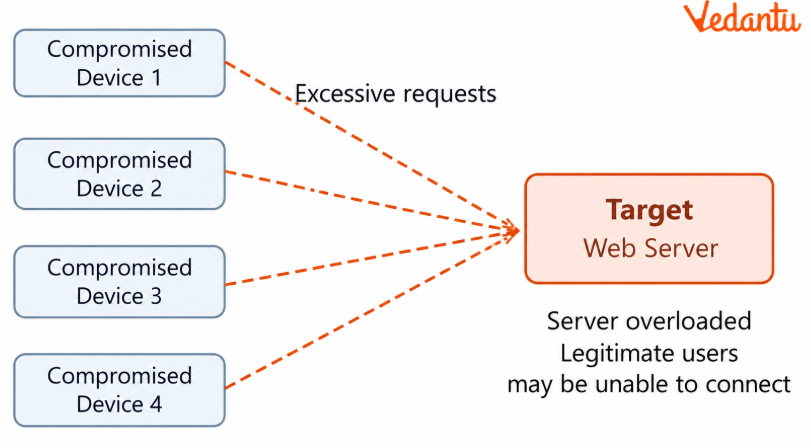
Multiple compromised devices send traffic towards one website, making it difficult for genuine users to access the service.
Explanation:
An attacker controls multiple compromised computers, sometimes called zombie computers.
These devices may be connected into a network called a botnet.
The devices send large numbers of requests to the targeted server.
The server may struggle to process the incoming traffic.
Genuine users may experience delays or complete service unavailability.
Conclusion: DDoS attacks are often harder to manage than single-source DoS attacks because malicious traffic comes from many distributed locations.
Q15. Differentiate between snooping and eavesdropping. Explain how they can threaten private network communication.
Answer: Both snooping and eavesdropping can threaten the privacy of information transmitted over networks. However, Chapter 12 distinguishes them according to how the communication is monitored.
Example 1: Snooping
A malicious user captures unencrypted network packets travelling across a network and examines the data later. If those packets contain sensitive information, it may be exposed.
Example 2: Eavesdropping
An unauthorised person secretly listens to a private voice call or monitors a live online conversation.
Risks involved:
Exposure of personal or confidential information.
Loss of privacy during communication.
Possible theft of sensitive data.
Misuse of intercepted information.
Preventive measures:
Use encrypted connections such as HTTPS for websites.
Avoid entering sensitive information on untrusted networks.
Keep devices and communication software updated.
Protect accounts using strong passwords and appropriate authentication.
Avoid installing suspicious software that could compromise microphones, cameras or network communications.
Conclusion: Snooping focuses on capturing and analysing network traffic, while eavesdropping involves unauthorised real-time monitoring of private communication. Encryption and secure device practices help reduce these risks.
How Can Class 12 Computer Science Chapter 12 Help Students Understand Online Security?
Online security is important whenever students browse websites, download files or share information online. Vedantu's Class 12 Computer Science Chapter 12 Important Questions help students recognise cyber threats and understand ways to protect devices, accounts and personal data.
How to Practise Class 12 Computer Science Chapter 12 Important Questions Effectively?
Identify cyber threats: Match real-life situations with the correct malware or attack type.
Compare security concepts: Practise differences such as virus versus worm and HTTP versus HTTPS.
Understand prevention: Learn how antivirus software, firewalls and safe browsing protect systems.
Solve application-based questions: Explain what to do when a computer shows signs of malware.
Revise key definitions: Focus on cookies, hackers, malware detection and network intrusion.
Important Study Material Links for Class 12 Computer Science Chapter 12
Students can strengthen their understanding of Security Aspects using these chapter-specific learning resources.
Class 12 Computer Science Chapter-Wise Important Questions
Explore other Computer Science chapters to strengthen your understanding of programming, data structures, databases and networking.
Additional Study Materials for Class 12 Computer Science
FAQs on Important Questions and Answers for Class 12 Computer Science Chapter 12 Security Aspects | 2026-27
1. Where can I download Class 12 Computer Science Chapter 12 Important Questions PDF?
Students can download the Class 12 Computer Science Chapter 12 Important Questions PDF from Vedantu once the downloadable file is available on the page. It covers malware, antivirus software, HTTP and HTTPS, firewalls, cookies and network threats through solved questions.
2. What types of MCQs should I practise from Class 12 Computer Science Chapter 12?
Class 12 Computer Science Chapter 12 important questions MCQ practice should include identifying malware, recognising antivirus detection methods, understanding HTTPS, selecting suitable security measures and differentiating between network attacks.
3. Can a computer get infected with malware without downloading a program deliberately?
Yes. Malware can reach a computer through infected email attachments, compromised websites, removable storage devices or network vulnerabilities. Users should keep their software updated and avoid opening suspicious links and files.
4. Why is a worm more capable of spreading independently than a computer virus?
A worm can replicate and spread through network connections without attaching itself to a host program. A virus usually spreads by infecting another program or executable file and running when that infected code is executed.
5. Does HTTPS mean a website is completely safe?
No. HTTPS encrypts communication between the browser and server, but it does not guarantee that the website is genuine or harmless. Students should still check website addresses carefully and avoid sharing information on suspicious sites.
6. How can a student recognise a possible ransomware infection?
Possible signs include files becoming inaccessible, unexpected encryption of documents and messages demanding payment to restore access. Regular backups and updated security software help reduce the impact of such attacks.
7. What is the difference between signature-based detection and sandbox detection?
Signature-based detection compares suspicious files with known malware patterns. Sandbox detection runs a program in an isolated environment and examines its behaviour. These approaches help antivirus software recognise different types of threats.
8. Are browser cookies harmful to a computer?
Cookies are generally used to maintain sessions, remember preferences and support website features. They are not executable malware by themselves. However, some cookies can raise privacy concerns because they may be used to track browsing activity.
9. What should I do if my computer starts displaying unknown programs and repeated pop-ups?
Avoid interacting with suspicious pop-ups, update and run trusted security software, and check for unfamiliar applications. If an infection is suspected, disconnecting from the network may help limit further communication while the problem is investigated.
10. What is the difference between a keylogger and spyware?
A keylogger records keyboard inputs, which may expose passwords and other sensitive information. Spyware is a broader type of malicious software that secretly collects user information, such as browsing activity, login details or personal data. A malicious keylogger can therefore be considered a form of spyware.