


Class 12 Computer Science Chapter 10 Computer Networks: Key Questions for Exam Preparation
The Class 12 Computer Science Chapter 10 Important Questions PDF brings together essential questions on network types, device functions, topologies, addressing and Internet services. It helps students practise the terminology, comparisons and labelled diagrams covered in the NCERT chapter.
Students can practise MCQs, short and long answer questions on network types, devices, topologies, MAC and IP addresses, and DNS to strengthen their concepts and exam preparation.
Class 12 Computer Science Chapter 10 Multiple Choice Questions
Q1. Which of the following best defines a computer network?
a. A single computer with several files
b. Two or more interconnected computers or computing devices
c. Only computers connected to the Internet
d. A collection of unrelated software
Answer:
(b) Two or more interconnected computers or computing devices.
Q2. What is the usual approximate range of a Personal Area Network (PAN)?
a. 10 metres
b. 30–40 kilometres
c. An entire country
d. A continent
Answer:
(a) 10 metres.
Q3. A network connecting computers across a city is usually a:
a. PAN
b. LAN
c. MAN
d. NIC
Answer:
(c) MAN.
Q4. Which device converts digital data into analog signals and back?
a. Hub
b. Modem
c. Repeater
d. RJ45 connector
Answer:
(b) Modem.
Q5. Which device sends incoming data to all its other connected lines?
a. Hub
b. Switch
c. Router
d. Gateway
Answer:
(a) Hub.
Q6. In which topology is every device connected directly to every other device?
a. Ring
b. Bus
c. Star
d. Mesh
Answer:
(d) Mesh.
Q7. What happens in a star topology if the central networking device fails?
a. Only one end device fails
b. The complete network may fail
c. The network automatically becomes a ring
d. All links become wireless
Answer:
(b) The complete network may fail.
Q8. How many bits are there in an IPv4 address?
a. 12
b. 24
c. 32
d. 128
Answer:
(c) 32 bits.
Q9. Which technology is used to define the basic structure of web pages?
a. HTML
b. DNS
c. NIC
d. PAN
Answer:
(a) HTML.
Q10. What is the principal function of a DNS server?
a. To regenerate weak cable signals
b. To map domain names to IP addresses
c. To connect only Bluetooth devices
d. To supply Ethernet connectors
Answer:
(b) To map domain names to IP addresses.
Class 12 Computer Science Chapter 10 Very Short Answer Questions
Q11. What is a node in a computer network?
Answer:
A node is a device in a network that can receive, create, store or send data. Examples include a computer, printer, router and server.
Q12. What are packets in network communication?
Answer:
Packets are smaller chunks into which data is divided before it is carried across a network.
Q13. Expand NIC and state its purpose.
Answer:
NIC stands for Network Interface Card. It acts as an interface between a computer and a wired network.
Q14. What is an RJ45 connector?
Answer:
An RJ45 (Registered Jack-45) is an eight-pin connector used with Ethernet cables for networking.
Q15. What does a repeater do?
Answer:
A repeater regenerates weakened signals on a cable and sends the restored signals onward.
Q16. State the difference between a domain name and an IP address.
Answer:
A domain name is a readable name assigned to a website or host; an IP address is its numerical network address. DNS associates the two.
Q17. Give one example each of a wired PAN and a wireless PAN.
Answer:
Wired PAN: a phone connected to a laptop using USB. Wireless PAN: two smartphones communicating through Bluetooth.
Class 12 Computer Science Chapter 10 Short Answer Questions
Q18. Explain any three benefits or uses of a computer network.
Answer:
1. It enables exchange of information through email, websites and calls.
2. Multiple computers can share resources, such as a printer.
3. Users can access shared network storage and exchange files.
Q19. Differentiate between LAN, MAN and WAN with one example of each.
Answer:
LAN: covers a room, building or campus; example: a school computer laboratory.
MAN: covers a town or city; example: a cable TV network.
WAN: covers distant regions, countries or continents; example: the Internet.
Q20. How is a switch different from a hub?
Answer:
A hub sends incoming data to all other connected lines; simultaneous transmissions can collide. A switch examines the destination address of a data packet and forwards it only to the selected destination device. A switch can also forward multiple packets at the same time.
Q21. Explain the purpose of a router and a gateway.
Answer:
A router receives and analyses packets and forwards them to other networks; it can connect a LAN to the Internet. A gateway is the entry and exit point between a network and the outside world, routing data toward other networks. A router may also be configured as a gateway.
Q22. Compare bus topology and star topology.
Answer:
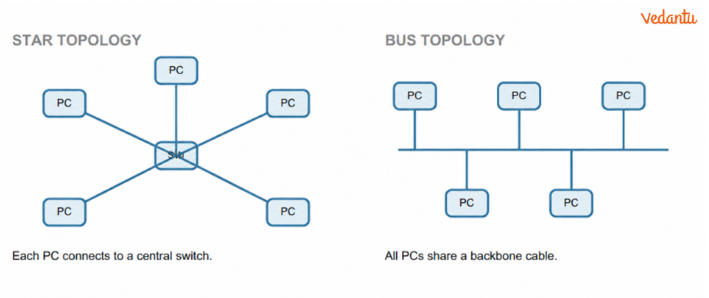
In a bus topology, devices share one backbone cable; it is cheaper, but the shared connection makes it less reliable. In a star topology, each device connects directly to a central hub or switch; failure of one peripheral device does not stop the others, but failure of the central device can disrupt the whole network.
Q23. Differentiate between a MAC address and an IP address.
Answer:
A MAC address is a 48-bit hexadecimal hardware address associated with a NIC; the chapter describes it as permanently assigned during manufacture. An IP address identifies a node using the Internet Protocol and can change when the node joins another network. IPv4 is 32-bit, whereas IPv6 is 128-bit.
Q24. What is the difference between the Internet and the World Wide Web?
Answer:
The Internet is a global network of interconnected computing devices. The World Wide Web is a collection of interlinked web pages and resources accessed using that network. The web is a service that uses the Internet; they are not identical.
Q25. Explain the roles of HTML, URL and HTTP in using the Web.
Answer:
HTML defines the basic structure of web pages. A URL identifies the location of a web resource. HTTP provides rules for retrieving linked web pages; HTTPS is its more secure version
Class 12 Computer Science Chapter 10 Long Answer Questions
Q26. Explain the five network topologies discussed in the chapter. Give one important feature of each.
Answer:
Mesh: every device has a direct connection to every other device; highly reliable, but cabling is complex and costly.
Ring: each device connects to two neighbours, forming a ring; the chapter describes one-way data flow.
Bus: all devices share a common backbone cable; economical but less reliable.
Star: each device connects to a central hub or switch; easy to isolate an end-device fault, but central-device failure may stop the network.
Tree/Hybrid: hierarchical branches combine basic topologies such as star, ring or bus; useful when connecting several LANs.
See the simple topology sketches below.
Q27. A school wants to connect computers in one laboratory, share a printer, and provide Internet access. Identify a suitable network type and explain the roles of a switch, router, NIC and printer.
Answer:
Network type: LAN, because all computers are in a limited area.
Switch: connects the laboratory devices and directs packets toward their destination.
Router: connects the LAN to the Internet or another network.
NIC: provides each computer with its wired network interface and MAC address.
Shared printer: can be used by multiple networked computers instead of providing a separate printer for each.
Q28. Explain IPv4 and IPv6. Why was IPv6 proposed? Include their sizes and notation.
Answer:
IPv4: a 32-bit address written as four decimal numbers separated by dots. Each number represents 8 bits and ranges from 0 to 255; example: 192.168.0.178.
Need for IPv6: IPv4 offers just under 4.3 billion addresses, so a larger address space was proposed as more devices joined the Internet.
IPv6: a 128-bit address represented by eight groups of hexadecimal numbers separated by colons; example: 2001:CDBA:0000:0000:0000:0000:3257:9652.
Q29. What is DNS? Describe how domain name resolution works when a user enters a website address.
Answer:
DNS means Domain Name System. It helps users reach websites using memorable domain names rather than numerical IP addresses.
Step 1: The user enters a URL in the browser.
Step 2: The browser needs the IP address associated with the domain name and consults DNS.
Step 3: A DNS server supplies the matching IP address, or directs the lookup to another DNS server.
Step 4: Using the resolved address, the browser retrieves the requested web resource.
Organisation: the chapter describes DNS servers as hierarchical, with root servers at the top.
Q30. Describe how networking developed from ARPANET to the World Wide Web using milestones given in the chapter.
Answer:
1961: the ARPANET idea was conceptualised.
1969: ARPANET became functional by connecting UCLA and Stanford Research Institute.
1971: Roy Tomlinson developed network messaging or email.
1974: the term Internet was coined and Telenet began commercial use of ARPANET.
1982: TCP/IP was introduced as a standard protocol on ARPANET.
1983: Domain Name System was introduced.
1986: NSFNET expanded connectivity.
1990: Tim Berners-Lee developed HTML and URL, giving rise to the WWW.
1997: the first Wi-Fi (802.11) standard was introduced. These milestones follow the chapter timeline.
Important Concepts and Questions to Focus on in Class 12 Computer Science Chapter 10
Computer Networks includes several concepts that students may confuse, particularly network types, networking devices and identification methods.
The table below identifies the major topics and the types of questions students should practise.
How Vedantu's Chapter 10 Important Questions Help Students Understand Computer Network
Vedantu's Class 12 Computer Science Chapter 10 Important Questions and Answers help students understand networking concepts through NCERT-based questions, clear explanations and practical examples.
Concept-Based Questions: Understand network types, topologies, networking devices, MAC and IP addresses, and DNS.
MCQs for Quick Revision: Test your knowledge of networking terms, device functions and Internet-related concepts.
Diagram-Based Practice: Learn to identify and draw star, bus and other network topologies with proper labels.
Short and Long Answer Questions: Practise explaining differences between LAN and WAN, routers and switches, and the Internet and WWW.
NCERT-Focused Preparation: Solve chapter-specific questions with clear answers to strengthen conceptual understanding and exam readiness.
With Vedantu's solved important questions, students can revise Chapter 10 more effectively, identify topics that need additional practice and improve their confidence in answering exam questions.
Important Study Material Links for Class 12 Computer Science Chapter 10 Computer Networks
Class 12 Computer Science Chapter-Wise Important Questions
Additional Study Materials for Class 12 Computer Science
FAQs on Important Questions and Answers for Class 12 Computer Science Chapter 10 Computer Networks | 2026-27
1. Where can students download the Class 12 Computer Science Chapter 10 NCERT Solutions PDF?
Students can access Class 12 Computer Science Chapter 10 Computer Networks NCERT Solutions on Vedantu. These solutions provide answers to textbook exercises on network types, networking devices, topologies and Internet services, helping students understand important concepts and prepare for exams.
2. What are the most important topics in Class 12 Computer Science Chapter 10 Computer Networks?
The key topics include:
Network Types: PAN, LAN, MAN and WAN.
Network Topologies: Bus, star, ring and mesh.
Networking Devices: Hub, switch, router, modem and repeater.
Network Addressing: MAC addresses, IP addresses and DNS.
Internet Concepts: ARPANET, Internet and World Wide Web.
Students should focus on understanding the functions, differences and practical applications of these topics.
3. How should students write long answers in Class 12 Computer Networks to score better marks?
Start with a clear definition and explain the main concepts in a logical order. Include suitable examples and draw labelled diagrams for network topologies. For comparison-based questions, use tables to explain differences between network types or devices clearly.
4. What common mistakes should students avoid when answering Computer Networks questions?
Common mistakes include:
Confusing the functions of hubs, switches and routers.
Mixing up MAC addresses with IP addresses.
Drawing incorrect star and bus topology diagrams.
Treating the Internet and World Wide Web as the same thing.
Using incorrect networking terminology in explanations.
Students should check their answers carefully and practise diagrams to improve accuracy.
5. What are the most important questions in Class 12 Computer Science Chapter 10?
Some useful questions for practice include:
What are the differences between LAN, MAN and WAN?
Explain star and bus topologies with diagrams.
Differentiate between a router, switch and hub.
What is the difference between MAC and IP addresses?
What is DNS, and how does it help access websites?
These questions focus on fundamental concepts from the Computer Networks chapter.
6. What topics are included in Class 12 Computer Science Chapter 10 Important Questions MCQs?
The topics included in MCQs are network types, topologies, networking devices, MAC and IP addresses, DNS and Internet terminology. Students can practise these questions to check their understanding of different networking concepts.